
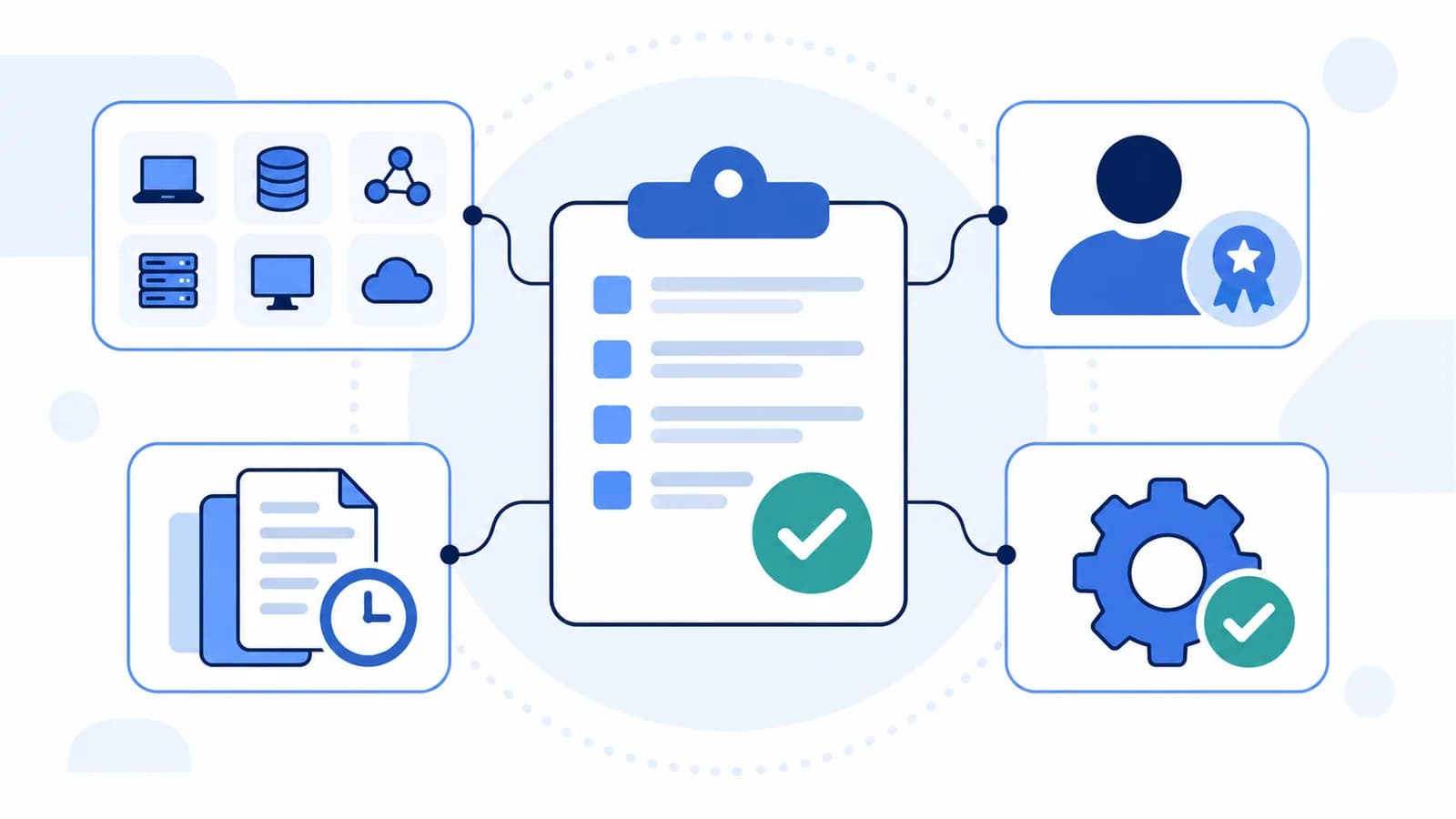
Configuration Management Plan: Template and Practical Example
A configuration management plan defines what a team controls, who owns it, how an approved configuration is established, and how changes are reviewed, implemented, and recorded. It gives people a shared operating procedure for maintaining a system without losing track of its state.
The document can apply to software, hardware, technical documentation, or the settings inside a SaaS platform. The practical question is the same: if something changes, can the team identify what changed, explain why it was allowed, and verify the resulting configuration?
This guide includes an original configuration management plan template, instructions for completing it, and a worked Genesys Cloud example. The template is usable without InProd; the example shows where configuration tooling supports the process.
What Is a Configuration Management Plan?
A configuration management plan, often shortened to CMP or CM plan, describes the responsibilities and procedures used to manage a product or system's configuration throughout its lifecycle. NIST's definition includes organizational responsibilities, policies, and operating procedures, not just technical settings.
Three related things serve different purposes:
- The plan defines the rules, owners, and evidence requirements.
- The configuration records identify the items being controlled and their approved and current states.
- The tools help implement changes, compare states, and retain history.
Installing configuration management software does not decide who may approve a production change, what counts as an exception, or when the approved baseline should change. Those decisions belong in the plan.
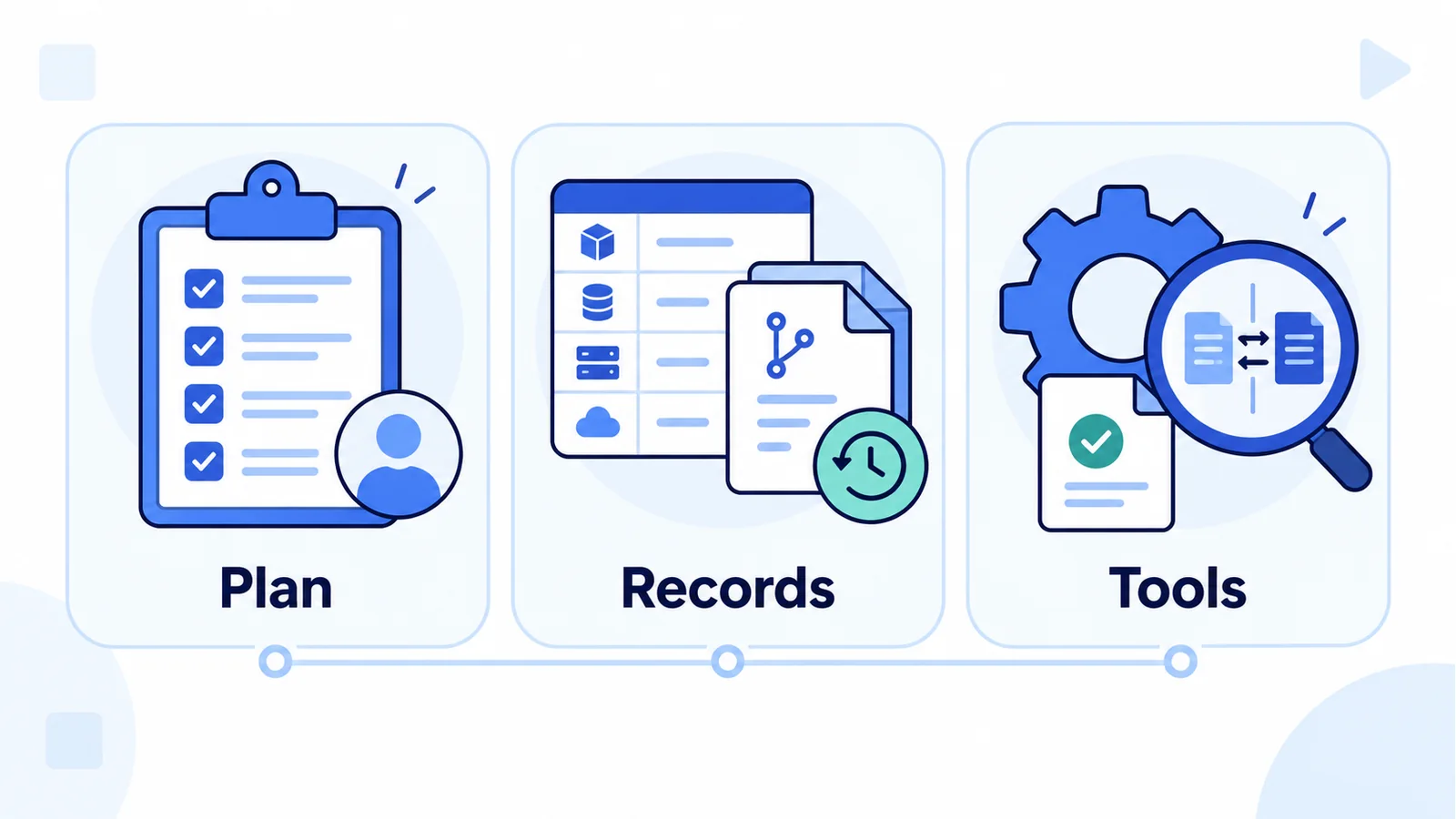
The plan defines the rules; records preserve state and history; tools help execute the controlled process.
A small team may use a short document and a shared register. A larger or regulated organization may need a formal review board, several system-specific plans, and additional records. Follow applicable organizational and contractual requirements, but keep the procedure usable. FHWA's planning guidance emphasizes tailoring the effort to the project and covering operations as well as development.
What Should a Configuration Management Plan Include?
The following sections turn broad governance intentions into instructions people can follow.
| Section | Decision it should settle | Record to identify |
|---|---|---|
| Purpose and scope | Which systems, environments, and items are controlled? | System boundary and exclusions |
| Roles and authority | Who owns, reviews, approves, and implements changes? | Named owners and delegates |
| Configuration identification | How are items uniquely identified and versioned? | Configuration item register |
| Baseline management | What state is approved, and who can replace it? | Approved baseline reference |
| Change control | How does a proposal become an authorized change? | Change request and approval |
| Status accounting | How can someone find the current state and history? | Status register and change records |
| Verification and audits | How is the resulting state checked? | Test results and comparison evidence |
| Exceptions and recovery | What happens during an emergency or failed change? | Incident and recovery records |
| Tools and record security | Where are records stored and who can access them? | Repositories and access rules |
| Plan maintenance | When is the procedure reviewed and updated? | Revision history and review date |
A configuration item, or CI, is an item you deliberately place under control because its identity, state, or relationship to other items matters. That might be a software package, design document, routing queue, schedule, or integration configuration. The CI register identifies these items; the plan explains how to manage them.
Configuration status accounting means keeping an accessible record of item states and changes. It should distinguish approved, deployed, pending, and superseded configurations. An approval ticket alone does not show what is currently running.
Configuration Management Plan Template
Copy the template below into your document editor, or open the editable text template and save a local copy. Replace the placeholders before asking the responsible owners to review it.
This is a general operational template, not a claim of compliance with a particular standard. Add the controls and records required for your organization.
CONFIGURATION MANAGEMENT PLAN

System or project: [name]
Document owner: [name or accountable role]
Version: [version]
Effective date: [date after approval]
Approved by: [name, role, and approval reference]
Next review: [date]
Revision history: [version, date, author, and reason]

1. PURPOSE AND SCOPE
Objective: [what this plan protects or enables]
Included systems and environments: [list]
Controlled item types: [list]
Excluded items and their owners: [list]
Applicable policies or contractual requirements: [references]

2. ROLES AND APPROVAL AUTHORITY
Plan owner: [responsibility and delegate]
Configuration owners: [item types and responsible people]
Technical reviewer: [responsibility and delegate]
Business or service approver: [responsibility and delegate]
Release operator: [responsibility and delegate]
Emergency approver: [authority and contact route]
Separation of duties: [which roles may not be combined]

3. CONFIGURATION IDENTIFICATION
Register location: [restricted repository or register]
Required fields: [ID, name, type, owner, environment, state]
Naming and version rules: [convention]
Dependencies: [how relationships are recorded and checked]
Environment mapping: [how target-specific values are resolved]

4. APPROVED BASELINES
Baseline contents and location: [reference]
Approval criteria and authority: [requirements]
Permitted environment differences: [record location]
Replacement rules: [review, approval, and retained old reference]

5. NORMAL CHANGE CONTROL
Request record: [purpose, items, target, risk, and dependencies]
Review and approval route: [by change category]
Pre-release checks: [validation and test requirements]
Implementation: [operator, window, and approved artifact]
Post-release checks: [expected state and behavior]
Closure: [required evidence and owner]

6. STATUS ACCOUNTING AND EVIDENCE
Record links: [request, approval, artifact, tests, run, and audit]
Statuses: [proposed, approved, deployed, failed, superseded]
Retention and access: [policy, owner, and permissions]

7. VERIFICATION AND CONFIGURATION AUDITS
Checks: [which items and comparisons are reviewed]
Frequency and triggers: [schedule and event-based reviews]
Reviewer: [owner and independence requirements]
Findings: [how discrepancies are tracked and closed]

8. EMERGENCY CHANGES AND RECOVERY
Emergency criteria: [when the route may be used]
Authorization and minimum record: [requirements]
Recovery trigger, approver, and method: [details]
Aftercare: [review, baseline decision, and environment alignment]
Aftercare deadline and owner: [requirements]

9. TOOLS AND RECORD PROTECTION
Approved tools and their purposes: [list]
Secrets handling: [secure references, never embedded credentials]
Access review and record backup: [procedure and owners]

10. PLAN MAINTENANCE
Review schedule: [frequency]
Additional triggers: [system, team, tool, or policy changes]
Revision approval and communication: [procedure]
How to Complete the Plan
Start with one system or service. A plan for every configuration in the business can become too vague to implement.
Define a Scope That Has an Owner
Identify the service, the environments it uses, and the item types the team can actually control. Then name what is outside that boundary and who owns it.
For a SaaS platform, distinguish tenant configuration from the infrastructure operated by the vendor. Your team may govern queues and permissions without controlling the provider's servers or availability architecture. The plan should not promise recovery of assets the team does not manage.
Assign Authority Before Choosing Tools
Specify who can propose a change, who checks it, and who authorizes its implementation. Name delegates so that absence does not turn into an unrecorded exception.
Use approval routes proportionate to risk. A previously reviewed, repeatable change may qualify for a defined standard-change procedure; a new routing policy or access change may require additional review. Do not treat every routine task as a board meeting, or every administrative edit as low risk.
For Genesys Cloud, the plan's approval authority should be consistent with actual roles and permissions. A written separation-of-duties rule is ineffective if the same person can bypass it through another account or deployment credential.
Identify Items and Their Dependencies
Record the item type, environment, owner, identifier, and relationships needed to interpret a change. A descriptive name helps people, but it is not a substitute for a unique reference.
Use logical names for cross-environment relationships and record the corresponding identifiers in each target. Do not assume that two similarly named queues, groups, or integrations are interchangeable across organizations.
If you build inventory automation, the Genesys Cloud API guide explains authenticated reads and pagination. Keep the inventory process separate from approval: reading an object's current value does not make that value the approved one.
Establish an Approved Baseline
A baseline is the agreed reference state against which later changes are evaluated. NIST describes baseline configuration as reviewed specifications subject to controlled change.
Identify the reference precisely: a repository revision, a configuration snapshot, an approved release manifest, or another record appropriate to the system. State its scope, approval, and verification status.
Do not automatically accept the latest production export as the baseline. It may contain an unauthorized edit. Record intentional differences, such as separate test endpoints or regional operating hours, rather than forcing every environment to be identical.
Make Evidence Part of Change Closure
Before implementation, record the purpose, affected items, dependencies, risk, approved artifact, and recovery method. After implementation, record what ran, its result, the resulting state, and the checks performed.
Store links between these records so a reviewer can reconstruct one change without searching multiple systems by memory. Specify retention through your organization's policy rather than inventing a universal retention period.
For a deeper treatment of execution, use the Genesys Cloud environment promotion guide. The plan needs to name the procedure and evidence it requires; it does not need to duplicate the entire pipeline implementation.
Configuration Management Plan Example for Genesys Cloud
The following completed example is illustrative. It describes a fictional customer-support service, not a customer deployment or a guarantee that every object is supported by one tool.
Purpose and Scope
System: Customer Support Voice Service. Plan version: 1.0. Accountable owner: Contact Center Platform Lead. Approval: Service Owner and Technical Reviewer, recorded in the team's controlled document register. Review: Quarterly and after material changes to the service or deployment process.
The plan covers routing configuration across three separate Genesys Cloud organizations: Development, UAT, and Production. Controlled items include the support queue, routing skills, the business-hours schedule, and associated customer-facing flow and prompt references.
Telephony-provider infrastructure, interaction recordings, and customer data are outside this configuration plan. Their operational owners maintain separate procedures. Flow content and connected services use their applicable native or specialist tooling; the release manifest records how each component is deployed and verified.
Owners and Approval Rules
| Role | Responsibility | Evidence |
|---|---|---|
| Platform Lead | Own the plan, inventory, and baseline decisions | Approved plan and baseline register |
| Configuration Engineer | Propose the change and prepare its artifacts | Change request and reviewed revision |
| Technical Reviewer | Review dependencies, mappings, tests, and recovery | Review findings and sign-off |
| Service Owner | Approve customer-facing behavior and release timing | Business approval |
| Release Operator | Execute the authorized release and record results | Target run and verification records |
For this example, the proposer cannot be the sole production approver. The Incident Manager may authorize an emergency change when service restoration cannot wait for the normal route. That exception still requires an incident reference and subsequent review.
Inventory and Baseline
The team maintains a restricted configuration register with logical IDs such as support-queue, support-hours, and support-inbound-flow. Each record includes its owner, target organization, native object reference, approved release reference, and dependencies.
Baseline support-release-1.0 is a reviewed manifest linking the approved configuration records, flow version, prompt references, and target mappings. It includes a separate environment-difference register: UAT uses a test destination, while Production uses the operational support destination. No credentials or customer records are stored in the manifest.
The baseline is accepted only after the team verifies the release. A deployment failure does not become the approved state just because some updates reached the target.
A Planned Change to Support Hours
The service owner wants support to remain open until 18:00 instead of 17:00 on weekdays. The change request identifies support-hours, the flow that evaluates the schedule, the support queue, and the expected open and closed caller paths.
The time zone is part of the request. Without it, "18:00" is not a complete requirement. The reviewer also checks whether another service shares the schedule and would be affected.
| Stage | Required action | Retained evidence |
|---|---|---|
| Proposal | Define the new hours, scope, target, and recovery trigger | Request and dependency list |
| Development | Prepare the approved configuration artifact and check references | Reviewed revision and validation result |
| UAT | Test open, closed, holiday, and boundary-time behavior | Test cases and results |
| Approval | Authorize the exact artifact and production window | Technical and business sign-off |
| Production | Execute against mapped targets and verify the resulting values | Run result and state comparison |
| Closure | Confirm caller behavior and decide whether to replace the baseline | Verification and baseline decision |
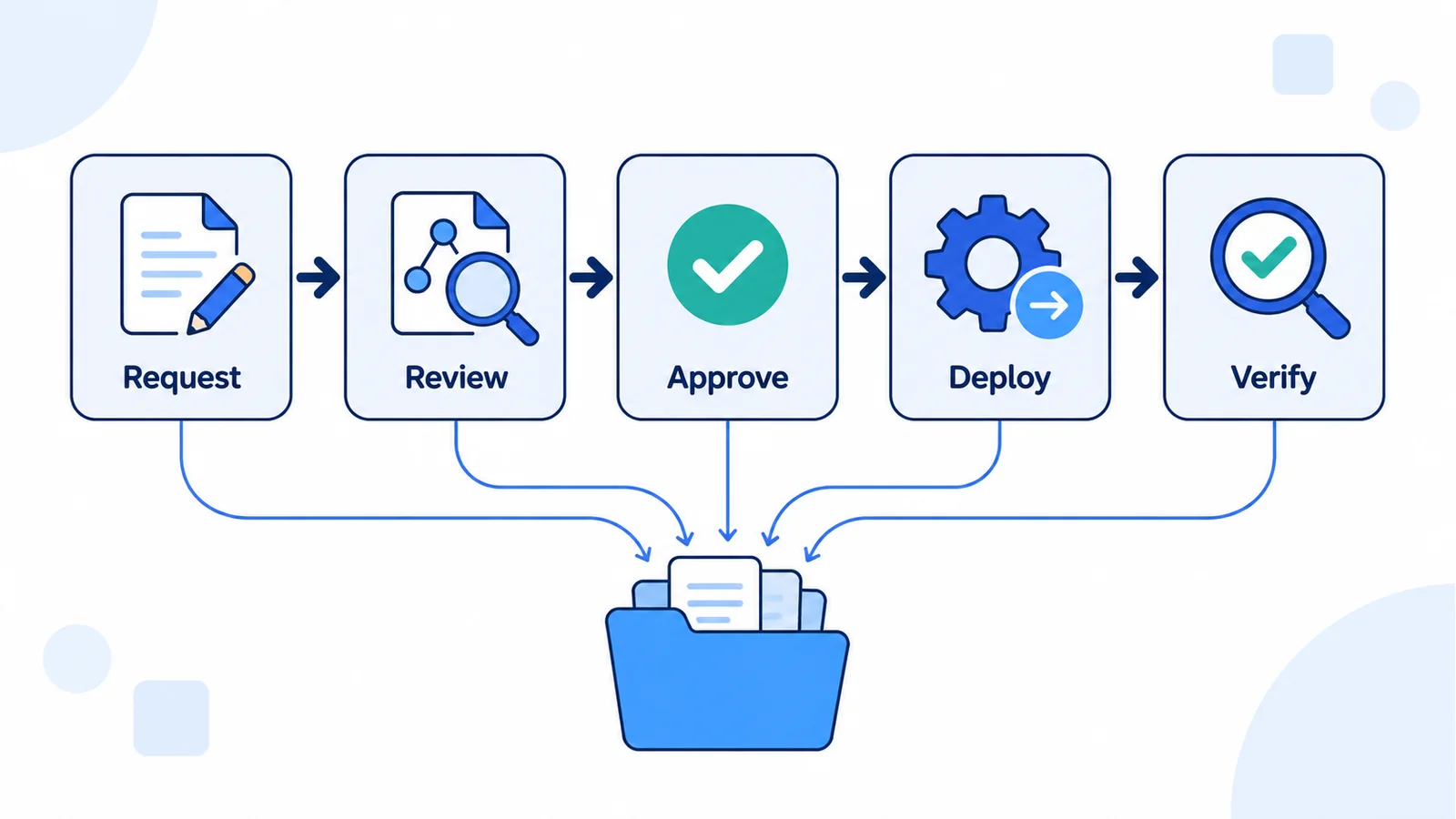
Each stage contributes evidence to the release record. Deployment and verification are separate steps.
The example's release procedure uses InProd changesets for supported configuration actions and the appropriate native workflow for other components. An unsupported dependency stays in the manifest with its own owner and checks; it is not silently omitted.
Configuration validation does not prove that the entire call journey works. The UAT evidence includes separate behavior tests, following the principles in the automated IVR testing guide. Production closure also checks the actual schedule and customer-visible routing behavior.
Emergency Changes and Recovery
If the updated schedule produces incorrect routing, the Release Operator stops further promotion and escalates to the Incident Manager. The recovery record identifies the previous approved values, the affected dependencies, the authorized restoration method, and the checks required after restoration. Consult the Genesys Cloud rollback guide when defining object-specific recovery paths.
An emergency production edit requires an incident reference, the actor, the time, the affected items, and before-and-after values where available. In this example, the Platform Lead must coordinate a review by the next business day. That deadline is an example policy choice, not a universal rule.
During the review, the team either accepts the emergency change into a new baseline or restores the approved configuration. It then reconciles Development and UAT through a reviewed change, preserving legitimate environment differences. It does not automatically copy every production edit into lower environments.
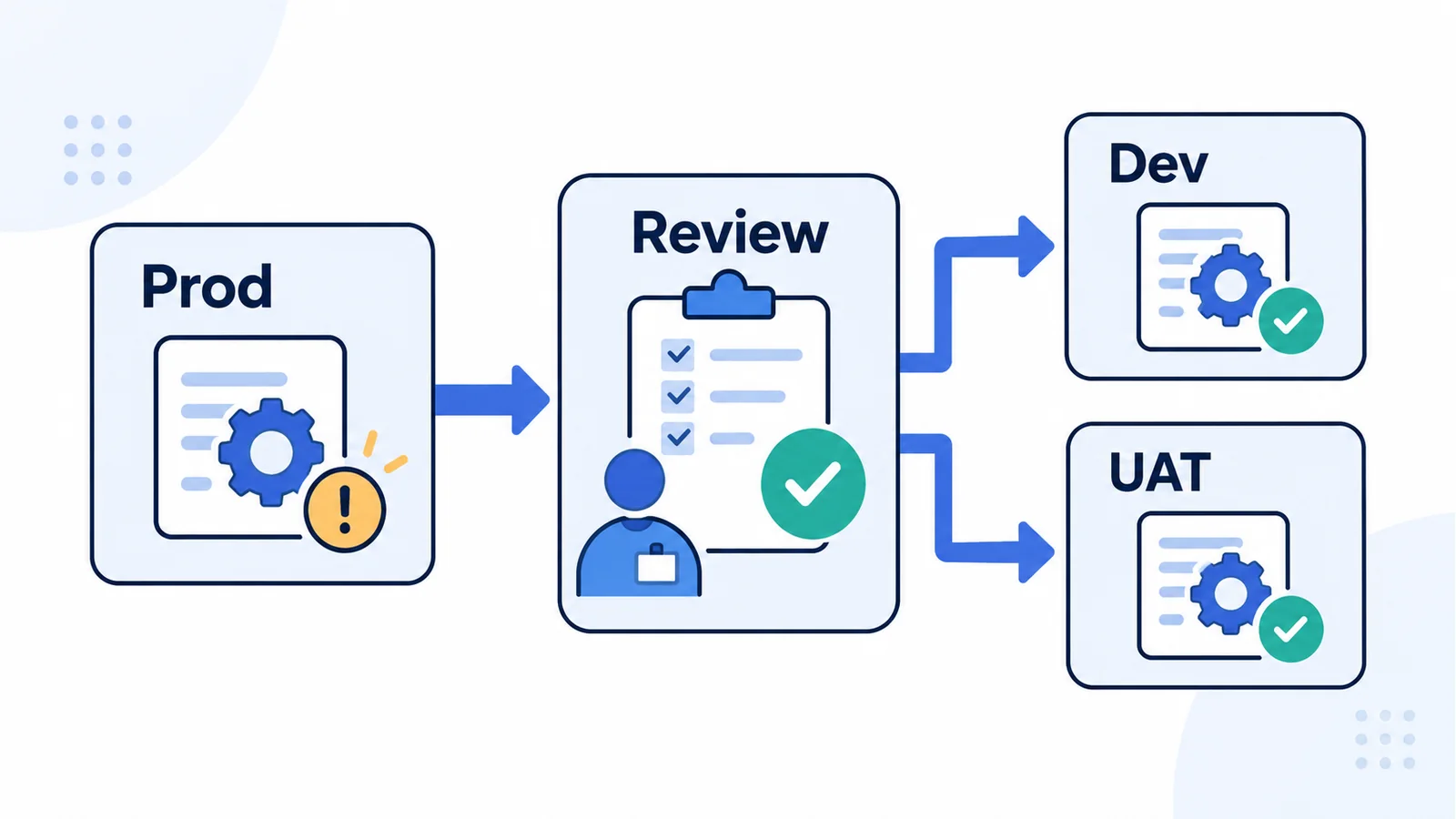
Emergency changes pass through review before approved configuration is reconciled with lower environments.
Records and Plan Maintenance
The example uses Git for versioned configuration artifacts, a change system for approvals, restricted test records for behavioral evidence, and configuration auditing for change history and comparison. The change request links these records into one release history.
The Platform Lead reviews privileged access through the team's permission-auditing process. Record retention, backups, and access permissions follow the organization's approved policies. Secrets remain in the designated secrets store, referenced by name rather than copied into the plan.
After each material process change, the owner updates the procedure, obtains approval, and informs the people expected to use it. A quarterly review confirms that owners, delegates, repositories, and recovery contacts are still correct.
Configuration Management Plan vs Change Management Plan
The documents overlap, but their scope is not identical.
| Document | Main question | Typical contents |
|---|---|---|
| Configuration management plan | Which items and states are controlled, and how are they maintained? | Item identification, baselines, versions, status records, verification |
| Technical change management plan or procedure | How is a proposed change evaluated and authorized? | Request categories, impact review, approvals, scheduling, implementation |
| Organizational change management plan | How will people adopt a new way of working? | Communication, training, stakeholder engagement, adoption measures |
In project management, change management can also govern changes to scope, schedule, cost, or other project baselines. State which meaning you use rather than assuming every reader means production administration.
A configuration management plan may reference the existing technical change procedure. It should then explain how that procedure updates controlled items, records state, and replaces an approved baseline. Our Genesys Cloud change control guide covers the technical workflow in more detail.
Configuration Management Plan Review Checklist
Before approving the document, ask a reviewer to follow one normal change and one emergency change through the proposed procedure.
- Scope includes environments and exclusions, with owners for adjacent systems.
- Controlled items have unique references, owners, and recorded dependencies.
- The approved baseline can be found and is distinguishable from live state.
- Intentional environment differences have owners and documented reasons.
- Approval authority and delegates are named and match practical access rights.
- Validation, behavior testing, and post-release verification are separate checks.
- Requests link to approvals, artifacts, execution results, and audit records.
- Recovery has a defined trigger, authority, method, and verification step.
- Emergency changes have a review deadline and a reconciliation owner.
- Secrets, retention, record backups, and access rules are addressed.
- The document has an owner, approval reference, and next review date.
If a reviewer cannot locate the evidence for an example change, the process needs more work even if every section of the template contains text.
Common Mistakes That Make the Plan Hard to Use
Treating tools as the process. A repository stores versions; it does not decide which version is approved. A ticket records intent; it does not establish the deployed state.
Defining scope as "all configuration." Name the controlled item types and exclusions. Otherwise, coverage gaps become invisible until an incident involves an unowned component.
Assuming identical environments. Test destinations, identifiers, credentials, and operating constraints may legitimately differ. Preserve those differences while governing the shared intent.
Keeping approval without implementation evidence. Record what ran and what was verified, including partial failures. Do not close a request solely because the pipeline finished.
Leaving emergency edits outside the baseline process. Service restoration is urgent, but undocumented aftercare leaves the next release based on stale assumptions.
Never reviewing the plan. Team changes and tool migrations can invalidate owners, permissions, and record locations. A document nobody can follow is not an effective control.
How InProd Supports a Configuration Management Plan
For Genesys Cloud teams, InProd helps execute parts of the configuration process rather than replacing its ownership decisions.
The changeset workflow supports packaging configuration actions, validation, simulation, and run history. An existing CI/CD pipeline can place those actions within the team's review and approval procedure. Confirm supported objects and actions when defining the release scope.
Configuration auditing provides change history and comparisons for investigation and release review. Change Sync supports keeping environments aligned through selected configuration changes. Its rule documentation explains that reference fields may need target-specific mapping and that generated actions should be reviewed before activation.
The team still defines its approved baseline, risk categories, approval authority, tests, and evidence retention. InProd does not make a copied template compliant, replace customer-journey testing, or govern Genesys infrastructure availability.
Frequently Asked Questions
Who Owns a Configuration Management Plan?
Assign ownership to the person accountable for the system's configuration process, such as a platform lead or configuration manager. Item owners, reviewers, approvers, and release operators contribute to the plan. Ownership should include maintaining the document, not merely writing its first version.
What Are the Five Core Functions of Configuration Management?
A common grouping is planning, configuration identification, change control, status accounting, and verification or audits. Terminology varies between frameworks. Use the labels required by your organization and explain how each function is implemented instead of treating a particular heading count as proof of completeness.
How Long Should a Configuration Management Plan Be?
Long enough to make scope, authority, procedures, and evidence clear. A focused service may need only a short plan with linked registers and runbooks. Larger programs may require formal documentation. Length does not show whether someone can use the procedure correctly.
Can the Template Be Used for Software or SaaS Configuration?
Yes. Replace the generic fields with the relevant items, environments, owners, baselines, and deployment procedures. For SaaS, distinguish customer-controlled configuration from the vendor-operated infrastructure and define recovery only for the layer you can manage.
Does the Template Establish NIST or Other Compliance?
No. It is an operational starting point. Compliance depends on the applicable requirements, implementation, evidence, and assessment. Have the responsible governance or compliance team review the plan against the requirements that apply to your system.
Start with One Service and One Real Change
Use the template to define a manageable scope, then walk a representative change through it. Check whether each owner knows what to do and whether the resulting evidence can be found. Fix those gaps before expanding the plan to more systems.
For Genesys Cloud, the next step is connecting that procedure to supported configuration validation, controlled promotion, environment comparison, and recovery workflows. Review your configuration process with InProd.

Jarrod Neven
Contact Center Expert, Director at InProd Solutions
Jarrod has been working in the enterprise CX space since 2001. Before starting InProd, he spent several years as a CTI Solutions Architect at Genesys itself, working across the APAC region with enterprise and government customers, which gives him a different perspective on how their platforms actually work under the hood. He's been Director at InProd Solutions since 2016, helping organizations cut through the complexity of Genesys Engage deployments.