
How to Automate IVR Testing: A Practical Guide
Automated IVR testing uses software to call an Interactive Voice Response system, navigate it with DTMF tones or speech, and compare the prompts, routing, integrations, and timing with expected results. It turns a manual dial-and-listen exercise into a repeatable test suite that can run before release, inside a CI/CD pipeline, on a schedule, or continuously in production.
To automate an IVR, start with the customer journeys that carry the most operational risk. Define the expected prompt, input, route, integration response, transfer destination, and timing at each step; run those journeys through controlled inbound or outbound calls; then store recordings, transcripts, and step results so failures can block a release and be diagnosed quickly.
The terms IVR test automation, IVR testing automation, and IVR automation testing describe this same core practice: using repeatable, software-driven calls to verify that an IVR behaves as intended. The important distinction is not the label. It is whether the test proves the real caller journey and produces evidence that a release team can act on.
That definition is simple. Building a dependable testing process is not. A modern IVR may branch by language, customer data, opening hours, intent, authentication status, and service availability. A single Architect change can affect prompts, queues, data actions, transfers, and fallback behaviour several steps later in the call.
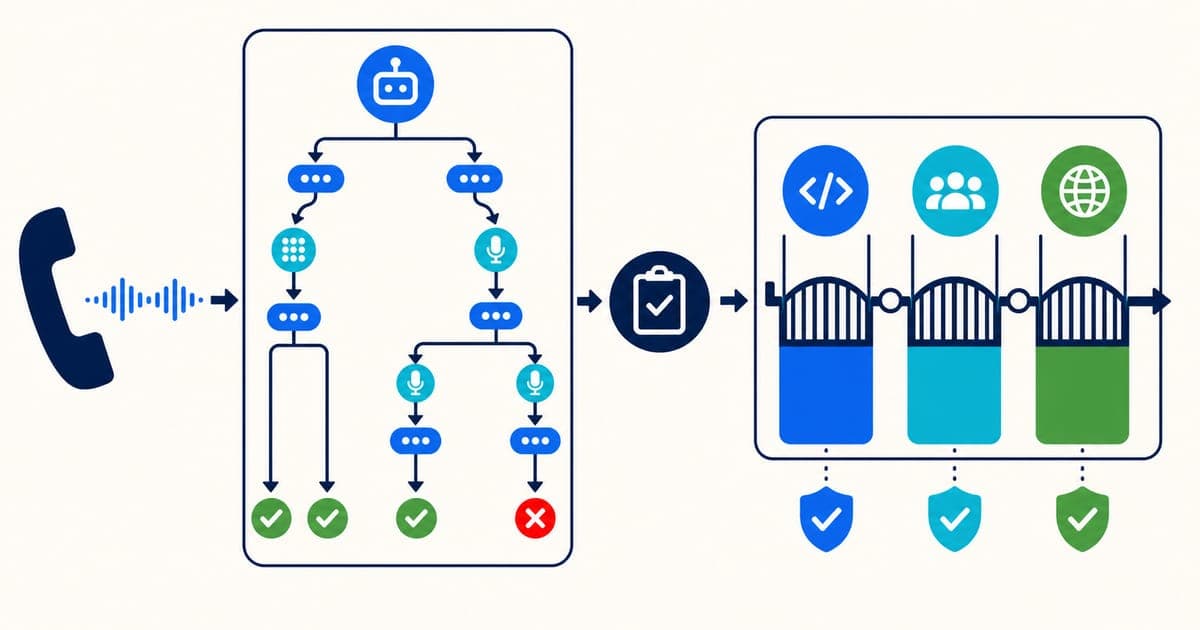
The answer is not merely to place more test calls. Reliable IVR delivery requires three controls working together: validate the proposed configuration, test the customer-visible journey through a real phone number, and monitor the live service after release.
What You Need to Automate IVR Testing
To automate IVR testing reliably, connect five capabilities into one repeatable workflow. The implementation can use a hosted IVR automation tool, a self-managed framework, or a combination of both, but each capability still needs a clear owner and pass criterion.
| Capability | What it does | Evidence to retain |
|---|---|---|
| Call generator | Places a controlled inbound call or answers an outbound call through the required carrier path | Called and calling number, timestamp, region, connection result |
| Interaction driver | Sends DTMF tones, speech, silence, interruptions, and timed responses | Input sequence and timing for every step |
| Observation layer | Captures prompts, transcripts, routing events, integration responses, and transfers | Recording, transcript, destination, response time |
| Assertion engine | Compares the observed journey with explicit expected outcomes and thresholds | Expected versus actual result with a pass or fail reason |
| Orchestration and reporting | Runs the right suite on demand, in CI/CD, or on a schedule and returns a machine-readable result | Test run ID, environment, release version, result, diagnostics |
A minimum working test should call a dedicated number, wait for the expected greeting, send one controlled input, verify the next prompt or destination, and save enough evidence to reproduce a failure. From there, add error paths, integrations, languages, transfers, and timing thresholds in risk order. Do not start by automating every branch in the IVR; start with the journeys whose failure would affect the most callers or block the most important business outcome.
For release testing, the automation also needs a stable environment identifier and a link to the deployed change. Without that context, a failed test proves that the journey is broken but does not tell the team which version introduced the problem or whether rollback is appropriate.
What Is Automated IVR Testing?
Automated IVR testing is end-to-end validation of a phone self-service journey without requiring a person to make each call. A test runner behaves like a caller, records what happens at every step, and decides whether the result meets defined expectations.
A typical automated test performs this sequence:
- Dial an inbound number through the public telephone network or a controlled telephony connection.
- Wait for the greeting and capture the audio.
- Confirm that the correct prompt played within an acceptable time.
- Send a keypad tone or spoken utterance.
- Follow the resulting branch through menus, data lookups, bots, queues, or transfers.
- Compare the observed prompt, transcript, destination, and timing with the expected result.
- Store recordings, transcripts, step results, and diagnostics for investigation.
For a traditional menu, many assertions are deterministic: pressing 2 should reach billing, an invalid digit should replay the menu, and no input should enter the configured timeout path. For a conversational IVR, validation also needs to accommodate variations in wording while checking the underlying intent, action, and outcome.
What Automated IVR Testing Should Validate
An IVR can answer a call and still be broken. A complete test therefore checks more than availability.
| Test area | Example assertion | Failure it can reveal |
|---|---|---|
| Call connection | The call answers within the agreed threshold | Carrier, number, trunk, or platform outage |
| Prompts | The expected greeting plays in the correct language | Missing, stale, silent, or wrong audio |
| DTMF | Pressing a key selects the intended option | Tone detection or menu-mapping error |
| Speech | The IVR recognises representative utterances | ASR, intent, accent, or noise sensitivity |
| Routing | The call reaches the correct queue, flow, bot, or number | Misrouting or broken transfer logic |
| Data actions | The correct response returns for a controlled test account | API, authentication, mapping, or dependency failure |
| Error paths | Invalid input, no input, and dependency failures are handled safely | Loops, abrupt disconnects, or dead ends |
| Timing | Prompts, lookups, and transfers complete within thresholds | Latency and performance degradation |
| End-to-end outcome | The caller completes the intended task | A technically working path that fails its business purpose |
This distinction matters in Genesys Cloud Architect. A flow can contain explicit failure and timeout paths, language settings, prompts, and transfer behaviour. Genesys' documentation also notes platform-specific behaviour—for example, some secure-flow transfer failures disconnect the call—which is why tests need to validate the deployed journey rather than infer behaviour from the diagram alone. See the official Genesys Cloud guide to creating call flows.
Types of Automated IVR Testing
The right test depends on the risk being controlled. Functional and regression tests prove behaviour. Load and performance tests prove capacity. Production tests prove that the service continues to work from the caller's perspective.
| Test type | What it answers | When to run it |
|---|---|---|
| Functional testing | Does each prompt, input, branch, lookup, and transfer behave correctly? | During development and before release |
| Regression testing | Did this change break a previously working path? | On every material IVR change |
| Integration testing | Do CRM, payment, identity, API, bot, and routing dependencies work together? | Before release and after dependency changes |
| Load testing | Does the system meet expectations at forecast concurrent call volume? | Before peaks, launches, and capacity changes |
| Stress and spike testing | How does the service fail and recover beyond expected capacity? | During resilience planning |
| Soak testing | Does performance degrade during sustained traffic? | Before major launches or infrastructure changes |
| Speech recognition testing | Does the IVR handle accents, phrasing, noise, silence, and interruptions? | Before launch and after model or prompt changes |
| Experience testing | Can a synthetic caller complete a critical journey in production? | Continuously or at short scheduled intervals |
The current SERP reflects this breadth. IR's IVR testing guide separates feature, regression, experience, load, and spike testing. Modern platforms such as Bespoken add automated flow discovery, multilingual testing, transcripts, and continuous monitoring. These are complementary practices, not interchangeable labels.
Inbound vs Outbound IVR Testing
Inbound and outbound IVR testing both use automated calls, but they start from opposite directions and prove different risks.
| Test direction | How the test starts | What the test should prove |
|---|---|---|
| Inbound IVR testing | The test runner calls a published IVR number and behaves like a customer | The number answers, the correct prompts play, DTMF and speech inputs work, integrations return the expected data, and the call reaches the intended queue, task, bot, or transfer destination |
| Outbound IVR testing | The contact center platform calls a controlled test number that can answer and respond | The dial attempt follows the intended campaign or notification rules, the correct message or menu plays, responses are captured, retries and failure handling work, and any transfer completes correctly |
For an inbound test, the automation acts as the caller. It needs to navigate opening-hours logic, authentication, menus, error paths, and transfers from the public entry point. A useful inbound suite includes the main customer journeys as well as no-input, invalid-input, closed-hours, and failed-integration scenarios.
For an outbound test, the automation also needs a controlled destination that can answer the call and provide DTMF or speech responses. Keep test records and numbers separate from real customer campaigns, and include consent, suppression, retry, caller-ID, and regional calling rules in the release checklist where they apply.
Maintain separate inbound and outbound regression groups even when they share prompts or backend services. Their call initiation, carrier path, permissions, and pass criteria differ, so combining them under one generic result can hide direction-specific failures.
Automated IVR Testing Needs Three Layers
The most useful way to design an IVR assurance process is to separate three layers that are often grouped together.
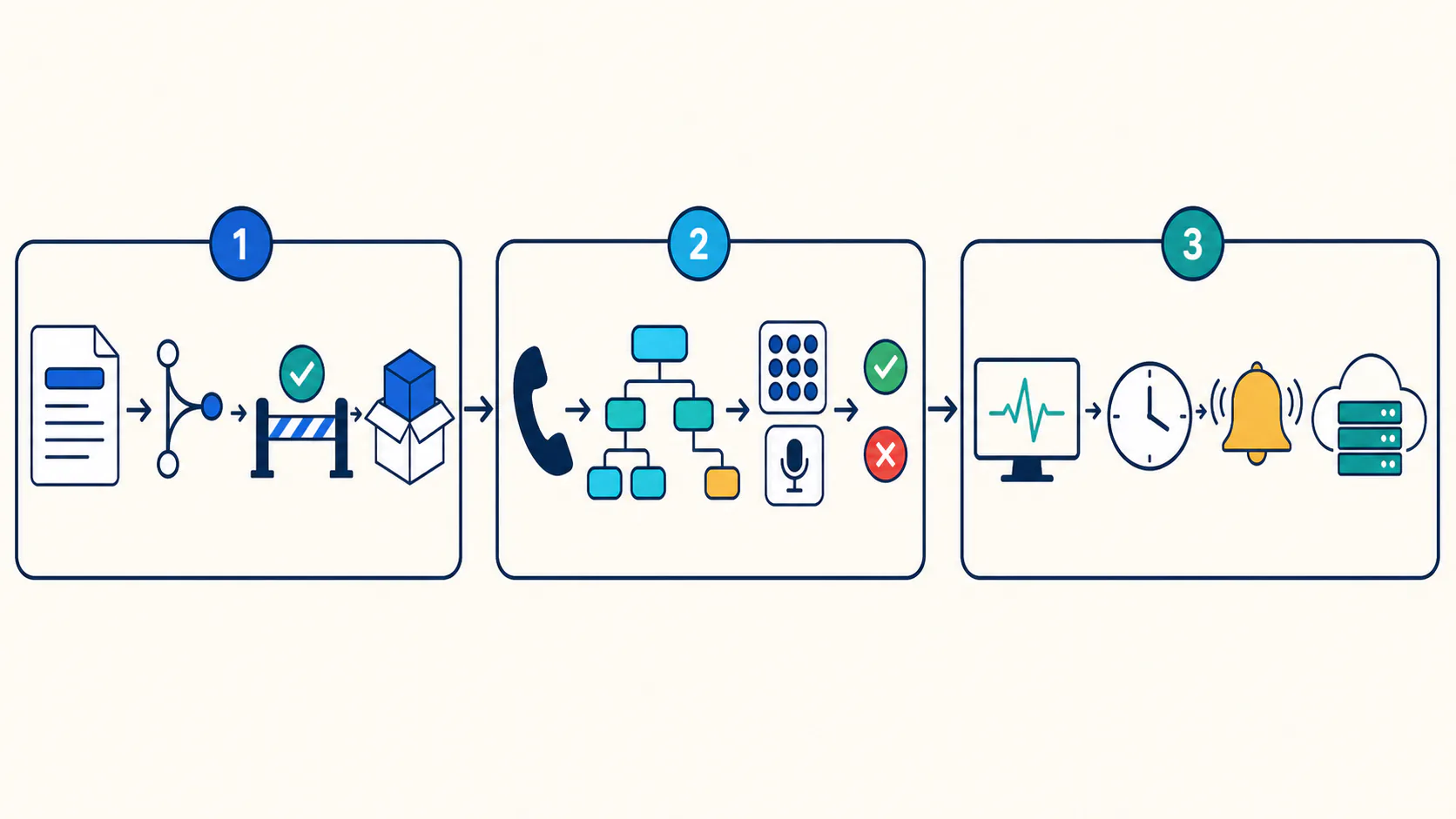
1. Configuration and release validation
This layer asks whether the proposed change is safe to promote. It covers the release artifact, target-environment dependencies, environment mappings, approvals, deployment evidence, and rollback plan.
For Genesys Cloud, a routing-flow change may depend on queues, schedules, prompts, data actions, and environment-specific identifiers. Validating only the call path after deployment leaves the team discovering configuration problems late.
InProd's Genesys Cloud DevOps workflow operates at this layer. Changesets, Simulate Run, promotion gates, and deployment records help teams understand and govern what will change before production is modified.
2. Customer-journey validation
This is where an IVR testing tool calls the deployed number and acts like a customer. It proves that the real telephony, audio, DTMF, speech, routing, and backend journey works end to end.
This layer should run in a test environment before production wherever possible. A focused smoke suite can then run immediately after deployment to verify critical live paths.
3. Production experience monitoring
Production monitoring repeats high-value calls on a schedule and alerts the team when availability, functionality, audio, or latency degrades. It catches failures caused by carriers and backend systems even when no IVR release occurred.
InProd does not replace the tool that places and scores those calls. Its role is to govern the configuration change that the test suite evaluates, preserve the deployment record, and help keep release and recovery controlled. The strongest design connects both systems in one Genesys Cloud CI/CD pipeline.
How to Automate IVR Testing Step by Step
A maintainable automation programme starts with risk and evidence, not with recording every possible menu permutation.
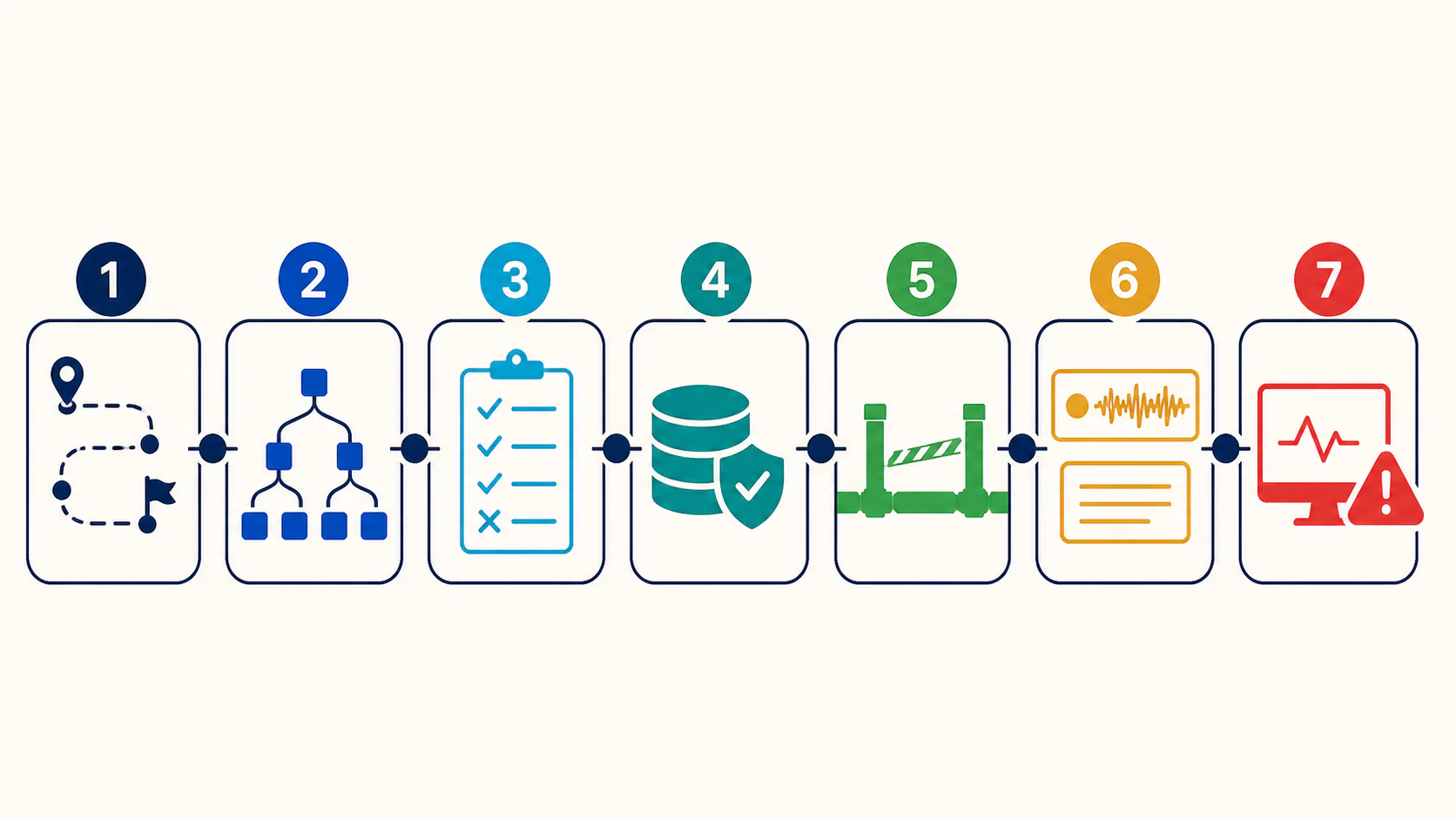
1. Map caller journeys to business outcomes
Begin with the journeys that carry the most customer or operational risk: authentication, payments, outage reporting, appointment management, priority routing, and transfer to an agent.
Define the outcome in customer terms. “Reached Task 14” is an implementation detail. “Authenticated test customer heard the correct balance and returned safely to the main menu” is a testable business result.
2. Build a path inventory
Record each input, expected response, destination, dependency, language, and exception path. Include more than the happy path:
- Valid, invalid, and missing DTMF input.
- Expected speech variations and low-confidence recognition.
- Silence, interruption, and repeated input.
- Open, closed, holiday, and emergency schedules.
- Successful, slow, malformed, and unavailable backend responses.
- Queue transfer, voicemail, callback, and disconnect behaviour.
- Supported languages and fallback language behaviour.
Genesys Cloud lets flow authors define failure and timeout paths for actions such as dial-by-extension. Those paths deserve first-class tests rather than being treated as edge cases. The Genesys action documentation provides a useful example of the choices a deployed flow must handle.
3. Define explicit pass and fail criteria
Avoid assertions such as “the prompt sounds right.” Use criteria that automation can evaluate and a reviewer can audit.
For example:
| Step | Input | Expected evidence | Threshold |
|---|---|---|---|
| Answer | Inbound test call | Greeting detected | Within 3 seconds |
| Menu | DTMF 2 | Billing prompt transcript | Correct prompt and language |
| Lookup | Controlled account ID | Expected masked balance response | Within 2 seconds |
| Transfer | DTMF 0 | Test queue destination | Correct queue and no disconnect |
Thresholds should reflect the organisation's real service objectives and baseline measurements. Copying another company's numbers creates a neat report, not a meaningful quality gate.
4. Keep test data controlled
Use dedicated test callers, test accounts, known backend responses, and non-customer destinations. Mask or avoid sensitive data in recordings and transcripts. For payment or secure flows, confirm what the testing platform is allowed to capture before enabling recording.
Test data must be stable enough to support assertions but realistic enough to exercise the same integrations as production. If a test account is excluded from routing rules or fraud controls, the suite may pass while real callers fail.
5. Connect tests to the release artifact
Tag suites by the configuration objects and customer journeys they cover. When a change affects the billing flow and its data action, the pipeline should run the billing regression suite before promotion rather than a generic handful of calls.
A governed flow is:
- Define and review the Genesys Cloud change.
- Run pre-deployment validation with Simulate Run.
- Deploy the reviewed artifact to Development or UAT.
- Execute the relevant automated IVR tests.
- Block promotion when a required test fails.
- Approve and deploy the same artifact to Production.
- Run critical smoke tests and retain their evidence with the release record.
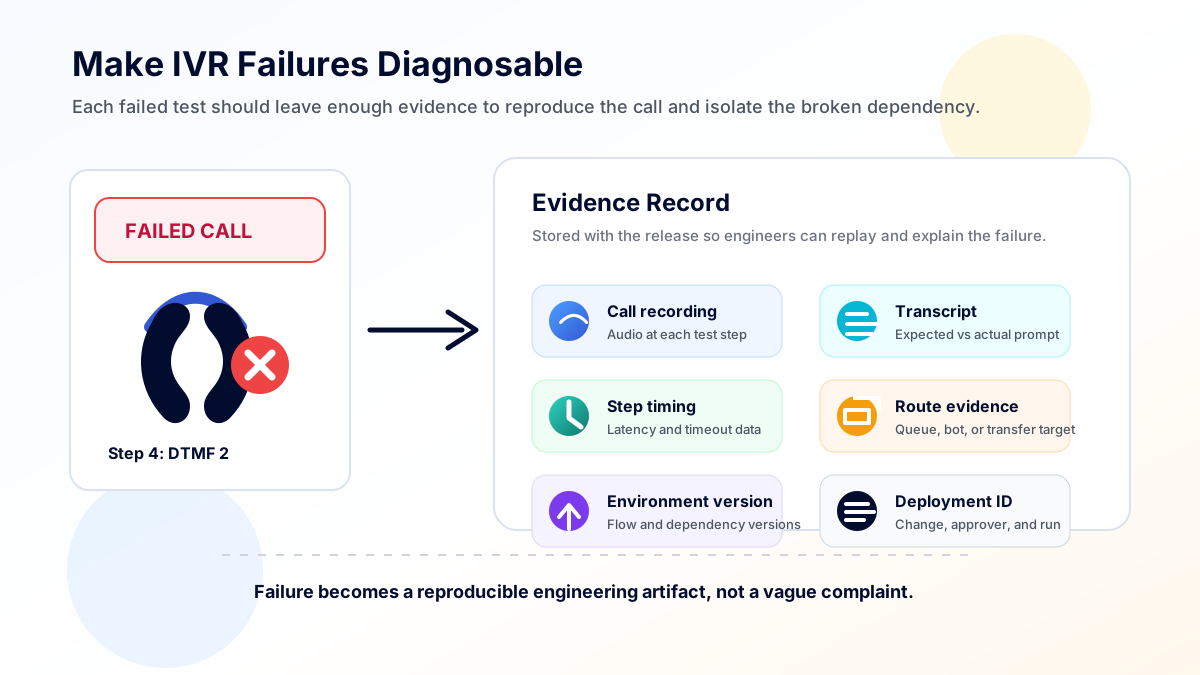
6. Make failures diagnosable
A red status without evidence sends engineers back to manual calling. Retain the call recording, transcript, input sequence, expected and actual result, step timing, called number, environment, flow version, and deployment identifier.
These records help distinguish a prompt mismatch from a carrier failure, data-action timeout, queue configuration issue, or speech-recognition error. They also make rerunning the exact failure after a fix much easier.
7. Add production monitoring selectively
Do not run the entire regression library every five minutes. Choose a small set of critical journeys that provide broad coverage without creating avoidable load, cost, or operational noise.
Use separate alert thresholds for availability, correctness, and latency. A call that completes slowly is not the same incident as a call that routes to the wrong queue.
A Genesys Cloud IVR Regression Example
Consider a contact centre adding a new billing option to its main inbound flow. The change updates the opening prompt, maps DTMF 2 to a billing task, calls an account API, and transfers failures to a specialist queue.
Static flow validation can catch missing references or invalid expressions. It cannot prove that the published prompt is audible over the telephone network, the carrier delivers the DTMF tone correctly, the test account returns the expected result, or the queue transfer completes.
The release should therefore combine controls:
- Before deployment: validate the changeset against the target Genesys Cloud environment and review the affected objects.
- In UAT: call the UAT number, select billing by DTMF and speech, validate the response, exercise invalid and no-input paths, and confirm successful and failed API outcomes.
- Before production: confirm that the same reviewed artifact is being promoted, check environment mappings and drift, and require approval.
- After production: run a small smoke suite through the live number and attach the evidence to the deployment record.
- Ongoing: monitor the critical billing path and alert separately on connection, correctness, transfer, and latency failures.
This model gives the team two kinds of evidence: what changed in Genesys Cloud and what a caller experienced after it changed. Either one alone leaves a blind spot.
How to Build an Automated IVR Regression Testing Suite
An automated IVR regression suite should prove that previously working customer journeys still work after a configuration, prompt, integration, routing, or platform change. It should not be one undifferentiated list of every possible call path. Organise the suite by business risk and by the release artifact that can affect each journey.
Use four layers of coverage:
| Suite layer | Scope | When it runs | Release decision |
|---|---|---|---|
| Pull-request validation | Static checks, dependency validation, and test-definition checks | Before a change is merged | Reject invalid or incomplete changes |
| UAT regression | Critical journeys plus paths affected by the proposed change | After deployment to UAT | Block production promotion when a required path fails |
| Production smoke testing | A small set of safe, high-value journeys | Immediately after production deployment | Trigger investigation or rollback when the live journey is broken |
| Continuous IVR monitoring | Narrow availability, correctness, and latency checks | On a schedule | Alert operations without rerunning the full regression library |
Build the suite from a journey inventory rather than from the Architect canvas alone. For every scenario, record the entry number, environment, language, test identity, input sequence, expected prompt or intent, integration response, destination, timing threshold, and retained evidence. Tag each scenario with the flows, queues, prompts, data actions, schedules, and integrations that can affect it so the pipeline can select the relevant tests for each release.
Keep deterministic and conversational assertions separate. Fixed prompts and DTMF routes can use exact expectations. Speech-enabled journeys need controlled utterance sets, confidence thresholds, semantic outcome checks, and tolerances for harmless transcript variation. Both types should retain enough evidence to distinguish a recognition problem from a routing, integration, carrier, or configuration failure.
IVR Testing Tools: How to Choose the Right Fit
IVR testing tools automate the work of calling an IVR, navigating menus or speech paths, capturing what happened, and comparing the caller experience with expected results. The best tool is the one that matches the deployed IVR and the evidence your release process requires. Evaluate capabilities against real test cases rather than a feature checklist alone.
For Genesys Cloud teams, an IVR testing tool should not sit apart from release governance. It validates the customer journey after a flow, queue, prompt, routing, or integration change is deployed. InProd governs the change that produced that journey: what changed, who approved it, which environment received it, whether dependencies were validated, and how the team can roll back if the IVR test fails.
Look for:
- Real inbound and outbound calling in the countries and carriers you need.
- Reliable DTMF generation and detection.
- Speech input, transcription, and semantic assertions for conversational flows.
- Branching, reusable, and data-driven test cases.
- Recordings, transcripts, per-step timing, and clear expected-versus-actual results.
- Functional, regression, load, and scheduled monitoring modes where required.
- APIs, webhooks, or command-line integration for CI/CD.
- Environment variables and secure secret handling.
- Role-based access, retention controls, and appropriate compliance support.
- Concurrency controls and transparent telephony costs.
- Failure replay and comparison across releases.
Open-source frameworks can work when a team is prepared to own telephony connectivity, prompt recognition, reporting, and maintenance. Commercial platforms can shorten implementation time, but their integrations, geographic coverage, testing model, and evidence quality still need validation against your environment.
Online IVR Testing: Hosted Platforms vs Self-Managed Automation
Online IVR testing usually means running tests through a hosted service that places real calls, follows DTMF or speech paths, captures prompts and transcripts, and reports the result through a web interface or API. It can reduce setup time, but “online” does not automatically mean the service is suitable for enterprise deployment gates or production monitoring.
| Approach | Best fit | What the team still owns |
|---|---|---|
| Hosted no-code testing | QA and operations teams that need fast scenario creation and scheduled checks | Test design, controlled data, environment mapping, release decisions, and evidence retention policy |
| Hosted API or CLI platform | Engineering teams integrating IVR tests into CI/CD | Pipeline orchestration, secrets, test selection, thresholds, approvals, and rollback triggers |
| Self-managed framework | Teams with specialist telephony capability or unusual protocol and data requirements | Calling infrastructure, speech and prompt recognition, reporting, maintenance, scaling, and support |
| Hybrid model | Enterprises combining business-authored journeys with engineering-controlled release gates | Ownership boundaries, shared test definitions, environment governance, and a common evidence model |
For enterprise deployments, verify calling coverage, concurrency, data residency, retention, access controls, audit history, private connectivity options, API reliability, and how the service handles sensitive recordings and transcripts. Run a proof of value against real inbound and outbound journeys before making the platform a production release gate.
Common Automated IVR Testing Mistakes
Testing the diagram instead of the deployed journey
A correct flow definition does not prove that its prompts, numbers, carriers, integrations, and queues work together. Always keep at least one outside-in test through the caller entry point.
Covering only happy paths
Timeout, no-input, invalid-input, failed lookup, closed-hours, and fallback routes are often where callers become trapped. Treat these as core coverage.
Using brittle transcript matching
Exact text comparisons work for fixed prompts but can create false failures when punctuation or harmless wording varies. Match deterministic prompts precisely and conversational outcomes semantically, with carefully chosen tolerances.
Running tests without release context
When a suite is disconnected from the deployed artifact, teams cannot quickly answer which change introduced the failure. Link test runs to the version, environment, approval, and deployment record.
Treating monitoring as regression testing
Monitoring is deliberately narrow and frequent. Regression testing is broad and change-oriented. Trying to make one suite serve both purposes either creates poor coverage or excessive production traffic.
Frequently Asked Questions
What is IVR test automation?
IVR test automation uses software-driven calls to navigate an IVR with DTMF or speech, verify prompts and routing, exercise integrations and failure paths, and compare actual outcomes with expected results. It is also commonly described as IVR testing automation or IVR automation testing.
What are IVR testing tools?
IVR testing tools are platforms or frameworks that place test calls, send keypad tones or speech, capture prompts and transcripts, follow call paths, and compare the observed journey with expected outcomes. They help teams test menus, routing, speech recognition, integrations, load, regression risk, and production availability.
How do you automate IVR testing?
Use a testing platform or framework that places calls, sends DTMF tones or speech, captures prompts and transcripts, follows defined paths, and compares actual outcomes with expected results. Connect the suite to the release pipeline so relevant tests run after deployment to a test environment and before production approval.
What is the difference between IVR testing and IVR monitoring?
IVR testing validates a defined change or system capability, often with broad functional and regression coverage. IVR monitoring repeatedly runs a smaller set of critical journeys in production to detect availability, correctness, or performance degradation.
Can automated IVR testing run in CI/CD?
Yes. The pipeline can deploy a reviewed IVR change to a test environment, call the testing platform through an API or command, wait for results, and block promotion when required scenarios fail. Production smoke tests can run after deployment while continuous monitoring remains a separate scheduled control.
Does Genesys Cloud Architect validation replace automated IVR testing?
No. Architect validation checks the flow definition. Automated outside-in testing checks the deployed caller experience across telephony, audio, DTMF or speech, routing, and integrated services. Both are necessary, and neither replaces production monitoring.
What should be automated first?
Start with high-volume or high-risk journeys, recent sources of incidents, and paths affected frequently by releases. Add their error and fallback routes before expanding into lower-risk menu permutations.
Build Testing Into the IVR Release Process
Automated IVR testing is most valuable when it is part of release governance rather than a separate QA activity. The test suite proves what the caller experiences. The deployment process proves which reviewed change produced that experience and how the team can recover if it fails.
For Genesys Cloud teams, InProd connects configuration as code, target-environment validation, controlled promotion, deployment evidence, and rollback planning. Pair that governance with an outside-in IVR testing platform to create a release process that is both technically tested and operationally controlled.

Jarrod Neven
Contact Center Expert, Director at InProd Solutions
Jarrod has been working in the enterprise CX space since 2001. Before starting InProd, he spent several years as a CTI Solutions Architect at Genesys itself, working across the APAC region with enterprise and government customers, which gives him a different perspective on how their platforms actually work under the hood. He's been Director at InProd Solutions since 2016, helping organizations cut through the complexity of Genesys Engage deployments.