
Genesys Cloud Roles and Permissions for Access Reviews
Genesys Cloud roles are easy to assign. They are far harder to review.
An administrator can grant a role in seconds. Understanding what that role actually allows, whether it conflicts with other access the user holds, and whether it was ever formally reviewed is a different problem entirely. For teams in regulated environments, that gap between assignment and governance is where audit findings begin.
Most Genesys Cloud environments manage permissions well enough when the platform is new and the team is small. As the environment grows, permissions accumulate. Users change responsibilities. Temporary access becomes permanent. Privileged accounts go dormant. And the access picture that audit teams need to produce is no longer something anyone can reconstruct quickly.
This article explains the difference between Genesys Cloud role assignments and effective permissions, where access reviews break down at scale, and what a better access governance process looks like for compliance-led environments.
What Genesys Cloud Roles and Permissions Actually Mean
Genesys Cloud controls access through a role-based model. A role is a named collection of permissions. When a user is assigned a role, they inherit the permissions that role contains. Roles can be built from Genesys Cloud's predefined permission set, and multiple roles can be assigned to a single user.
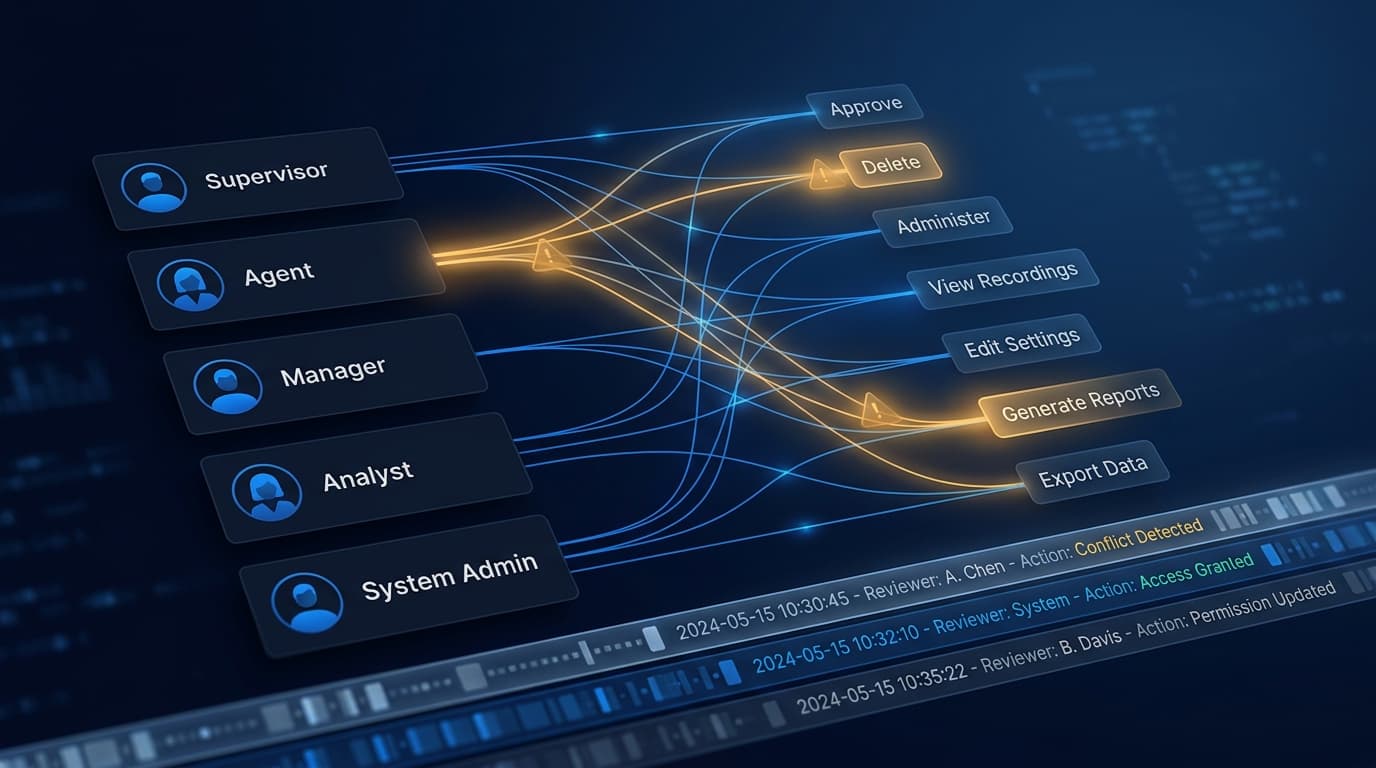
That model is intuitive at the assignment level. Assign a Supervisor role and the user gets supervisor access. The problem is that what "supervisor access" actually means in practice depends on which permissions that role was configured to include, which other roles the user holds simultaneously, and what the combined effective access looks like at the permission level.
A permission in Genesys Cloud is a specific right to perform a specific action on a specific resource type. Examples include the ability to view recordings, modify routing rules, manage users, approve quality evaluations, administer data actions, or access real-time dashboards. A role bundles many of these together.
The distinction that matters for access reviews is this: a role name describes what someone is called. The effective permissions describe what they can actually do.
Auditors do not ask whether someone holds a Supervisor role. They ask whether that person can approve evaluations, override queue settings, access sensitive recordings, or administer platform configuration. Those questions can only be answered by looking at the permission level, not the role name.
This distinction is also central to how Genesys Cloud configuration auditing connects to access governance: configuration changes and permission changes are two sides of the same compliance picture.
Why Role Reviews Alone Miss Real Access Risk
Most access reviews in Genesys Cloud start and stop at the role level. A manager is asked to confirm that the user they are certifying should hold a given role. They look at the role name, confirm it sounds right, and sign off.
That process fails for several reasons.
Permissions accumulate across roles
A user may hold three or four roles. Each role contributes permissions. The combined effective access may be significantly broader than any individual role implies. A user certified as holding appropriate roles may still have permissions they should not hold when the combination is considered.
Temporary assignments become permanent
Genesys Cloud permissions are sometimes granted temporarily to cover a shift, backfill a vacancy, or support a project. The temporary grant is easy to make and easy to forget. Without a process to track and recertify temporary access, it becomes permanent by default.
Role definitions change over time
Platform administrators update roles to reflect new feature capabilities, new divisional needs, or new configuration requirements. When a role changes, every user who holds that role inherits the new permissions. A user who was correctly certified last quarter may hold significantly different effective access today.
Admin UI changes bypass code-controlled processes
Not all permission changes come through formal processes. An administrator making an urgent change through the Genesys Cloud Admin UI may not update documentation, notify reviewers, or trigger any kind of review workflow. Access that was granted through an informal click-through can remain invisible in review processes that rely on exported reports or role lists.
Inherited and division-specific permissions are easy to miss
Genesys Cloud uses divisions to control which resources a user's permissions apply to. A user may have the same role assigned across multiple divisions with very different access implications in each. Reviews that treat role assignments as uniform across the environment miss this dimension entirely.
The result is a gap between the access picture as described in review records and the access picture as it actually exists in the platform.
The gap is not visible in a role-level review. It is only visible when you look at effective permissions.
Where Audit Findings Usually Start
Access control audit findings in Genesys Cloud environments tend to cluster around the same recurring problems. Understanding where they come from helps compliance teams focus review effort on the accounts and access patterns that carry the most risk.
Dormant privileged accounts
A user with administrative or elevated permissions who has not logged in or used their access for an extended period is a dormant privileged account. These accounts are a common audit finding because they represent access that has not been actively justified, monitored, or reduced.
Dormant accounts can exist for many reasons: a contractor who left, an internal transfer who still holds their previous role, an emergency account that was never decommissioned, or a supervisor whose responsibilities changed. Whatever the cause, the access remains and creates both a security risk and a compliance exposure.
Conflicting permissions and segregation of duties failures
Segregation of duties is the principle that certain combinations of access should not sit with a single person. In a contact center context, a user who can both create and approve the same action, access both a customer interaction and the quality evaluation of that interaction, or administer a system and also audit activity within it may represent a control failure.
Segregation of duties conflicts do not appear in a simple role review. They require looking at the effective permission combinations a user holds and checking those combinations against a defined set of rules about which pairings are risky or prohibited.
Genesys Cloud gives organisations significant flexibility in how roles are defined. That flexibility makes SoD analysis a manual, error-prone task unless the right tooling is in place.
Stale access after role changes
When a user changes role, department, or responsibility, their old access should be removed. In practice, the new access is often added but the old access is not always removed. Stale permissions persist because no formal process triggers a cleanup, and because nobody is monitoring for over-privileged accounts.
Auditors look for evidence that access is reviewed when it changes, not just when a periodic review cycle comes around.
Elevated access without documented justification
Privileged access should require documented business justification. When audit teams ask who holds elevated access and why, the answers should be clear and current. Access that was justified at the time of grant but has never been formally recertified presents an ongoing compliance gap.
Reviews that cannot be proven
A common audit finding is not that access was incorrect, but that the organisation cannot prove it was reviewed. If review evidence exists only in email threads, chat messages, or shared spreadsheets, it may not satisfy an auditor's evidence requirements. Reviews need to be formal, documented, associated with specific access decisions, and retained.
A review that was carried out but cannot be evidenced is, for audit purposes, a review that did not happen.
How to Run a Better Access Review in Genesys Cloud
A better access review process is not necessarily more complex. It is more structured. The key changes are around scope, timing, prioritisation, decision records, and evidence.
Fix the review scope at a point in time
Manual reviews fail partly because the access picture is a moving target. By the time a manager has reviewed fifty users, the first entries on the list may already be out of date. A reliable access review starts from a fixed snapshot: a defined point in time from which all review decisions are made.
That snapshot creates a stable review scope. Decisions made against it are meaningful because everyone is reviewing the same picture. Changes that occur after the snapshot date are captured in the next review cycle, not silently rolled into the current one.
Prioritise by risk, not by alphabet
Starting a review alphabetically or by department treats a dormant administrator account the same as a standard agent account. A risk-based review prioritises the accounts that matter most: users with privileged access, users who hold conflicting permissions, accounts that have not been used recently, and accounts where access has grown significantly since the last review.
Prioritising by risk means that if a review cannot be completed fully, the most important decisions are made first.
Require explicit decisions
A good access review records a decision for every item in scope, not just the ones where someone objects. Silence should not count as approval. Each reviewer should be required to either confirm that access is appropriate, request that access be removed, or escalate the decision to someone with more context.
Explicit decisions create accountability. They also create a record: this access was reviewed on this date, by this person, and approved or revoked for this reason.
Certify and retain evidence
When a review campaign is complete, the output should be a formal certification record: a signed-off document or system record confirming that access was reviewed, decisions were recorded, and any required remediations were actioned. That record needs to be retained in a form that can be presented to an auditor.
Evidence that lives in emails, shared drives, or spreadsheets is fragile. It is easy to lose, easy to alter, and hard to associate with specific access decisions. Certification records need to be structured, tamper-evident, and durable.
Make reviews repeatable
The most effective access review programs run on a regular schedule without rebuilding the process each time. That means the review scope, prioritisation rules, reviewer assignments, decision workflow, and certification format are defined in advance and reused each cycle.
Regularity is important for compliance purposes but also for operational reasons. Teams that run annual reviews tend to find more problems than teams that run quarterly reviews, because problems have had more time to accumulate. More frequent reviews, when they are lightweight and repeatable, are often more effective than infrequent exhaustive ones.
Repeatability also connects to broader Genesys Cloud DevOps governance: the same structured, auditable approach that applies to configuration changes should apply to access changes.
Why Effective Permission Visibility Changes The Process
Every step in the review process above is more effective when the team can see effective permissions rather than just role names.
| Review dimension | Role-level view | Effective permission view |
|---|---|---|
| What a user can do | Inferred from role name | Resolved to specific permission actions |
| Multi-role combinations | Not visible | Shown as combined effective access |
| Segregation of duties conflicts | Cannot be detected | Automatically surfaced |
| Division-specific access | Often missed | Included in permission scope |
| Privilege growth over time | Requires manual comparison | Visible across review cycles |
| Audit evidence quality | Role name sign-off | Permission-level decision record |
Investigation becomes faster
When a compliance team wants to understand whether a specific user has access to a sensitive capability, a role-level view requires them to trace through every role the user holds and check what each role contains. Effective permission visibility answers the question directly: here is what this user can do, here is where that access came from.
Conflict detection becomes possible
Segregation of duties analysis requires looking at permission combinations. A role-level view cannot identify whether two role assignments together create a problematic combination. Effective permission visibility makes that analysis possible, either through manual investigation or automated conflict detection against a defined rule set.
Review decisions become meaningful
A manager reviewing a role name makes an assumption about what that role means. A manager reviewing the specific permissions a user holds makes an informed decision. The second kind of review is harder to dismiss and harder to manipulate. It also produces evidence that is more defensible to an auditor.
Privilege growth becomes visible
When the same user is reviewed across multiple cycles, effective permission comparison shows whether their access has grown, shrunk, or changed character. An administrator who held ten sensitive permissions at the last review and now holds twenty is a meaningful escalation. A role-level review may not surface this at all if the role names have not changed.
Remediations become traceable
When an access review produces a revocation decision, the evidence record should be able to show exactly which permissions were removed as a result. That traceability connects the compliance decision to the platform change and gives the organisation a complete picture of what changed, when, and why.
Frequently Asked Questions
What is the difference between a Genesys Cloud role and a permission?
A role is a named container that bundles multiple permissions together. A permission is a specific right to perform a specific action on a specific type of resource. Users are assigned roles, not individual permissions directly. The effective permissions a user holds are the sum of all permissions contained in all roles assigned to them.
Why do access reviews in Genesys Cloud need to go beyond role names?
Because auditors assess what users can actually do, not what their roles are named. Role names do not reveal which permissions they contain, which other roles the user also holds, or whether the combined access creates a segregation of duties conflict.
What is segregation of duties in a Genesys Cloud context?
Segregation of duties means that certain combinations of permissions should not sit with a single user. In a contact center, this might mean separating the ability to manage recordings from the ability to access them for review, or separating the ability to configure routing from the ability to approve changes to it. The specific rules vary by organisation and by compliance framework.
How often should Genesys Cloud access reviews run?
For most regulated environments, a minimum of an annual formal access review is required by frameworks such as ISO 27001 and SOC 2. Many organisations run quarterly reviews for privileged and high-risk accounts. The right frequency depends on the environment, the compliance requirements, and the operational risk appetite.
What compliance frameworks require user access reviews?
ISO 27001, SOC 2, PCI DSS, APRA CPS 234, and most enterprise security frameworks include requirements around periodic access review, access certification, and evidence of segregation of duties controls. The specific control requirements vary, but the expectation that access is reviewed, documented, and certified is consistent across all of them.
What evidence do auditors typically require for access reviews?
Auditors typically want to see a defined review scope, a record of who reviewed each access item, the decisions made, the date of review, the name of the certifier, and evidence that any revocations or remediations were carried out. Reviews documented only in email or spreadsheets are often difficult to defend as formal evidence.
From Role Review to Access Governance
Genesys Cloud roles and permissions are not difficult to understand individually. The governance challenge is scale, accumulation, and the gap between what roles are named and what they allow.
Teams that run role-level reviews are usually doing the right thing with the wrong data. Effective permissions, conflict detection, structured review campaigns, and formal certification evidence are the controls that turn a manual compliance exercise into a repeatable governance process.
If your team is still reviewing Genesys Cloud access in spreadsheets, Permission Auditing gives you a continuous view of effective permissions, conflict detection, and formal access reviews in one workflow.
For teams also managing configuration change governance, Genesys Cloud configuration auditing and DevOps automation for Genesys Cloud address the adjacent controls that regulated environments typically need alongside access governance.
Book a call with the InProd team to discuss access governance in your Genesys Cloud environment.

Jarrod Neven
Contact Center Expert, Director at InProd Solutions
Jarrod has been working in the enterprise CX space since 2001. Before starting InProd, he spent several years as a CTI Solutions Architect at Genesys itself, working across the APAC region with enterprise and government customers, which gives him a different perspective on how their platforms actually work under the hood. He's been Director at InProd Solutions since 2016, helping organizations cut through the complexity of Genesys Engage deployments.