
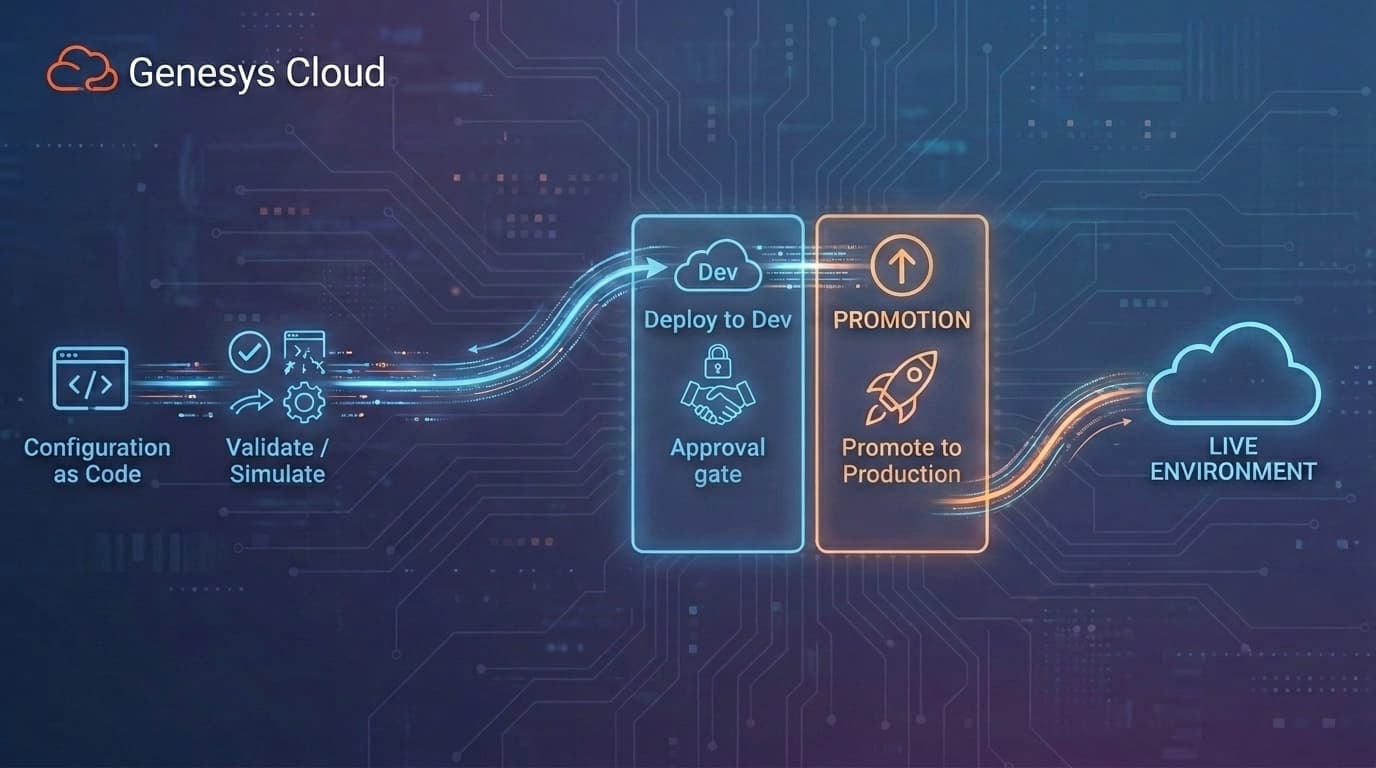
Genesys Cloud CI/CD Pipeline: Validation and Promotion
A Genesys Cloud CI/CD pipeline is a governed release process for moving contact center configuration changes from Development through UAT and Production. The goal is not only to automate deployment. The goal is to make every change validated, approved, auditable, and recoverable before it reaches the customer-facing environment.
That distinction matters. A script that updates a queue is automation. A production-grade Genesys Cloud CI/CD pipeline is a complete operating model: configuration is defined as code, validated against the target environment, promoted as a reviewed artifact, approved before production, recorded after deployment, monitored for drift, and paired with a rollback plan.
For enterprise contact centers, that is the difference between "we can deploy faster" and "we can safely change the platform that routes customer interactions."
Why Genesys Cloud CI/CD Needs Governance
Contact center configuration changes are not harmless administrative edits. A routing rule, queue threshold, skill assignment, schedule, data action, or flow dependency can change where customers go, how long they wait, which agents receive work, and whether the operation meets service targets.
Manual promotion breaks down because it asks engineers and administrators to perfectly replicate complex configuration steps across multiple Genesys Cloud organizations. Development, UAT, and Production may look similar on paper, but they often differ in real-world details:
- Production has more queues, users, locations, divisions, and integrations.
- UAT may use test numbers, mock data, or smaller routing models.
- Emergency production changes may not be copied back to lower environments.
- Admin UI updates may exist outside Git, Terraform, or CX as Code.
- Object IDs, names, dependencies, and regional settings can vary between orgs.
When those differences are invisible, UAT stops predicting production. A change can pass testing and fail live because the target environment is not the environment the team thought it was.
That is the pipeline problem InProd is designed to solve for Genesys Cloud DevOps automation.
The Pipeline Problem
Most teams do not start with a bad process. They start with a process that works when the environment is small.
An admin makes a queue change in Development. Someone repeats it in UAT. After testing, someone repeats it again in Production. The team documents the steps in a ticket or spreadsheet. For a handful of low-risk changes, this can feel manageable.
At scale, the model fractures.
| Problem | What happens | Why it matters |
|---|---|---|
| No pre-deployment validation | Teams cannot see the target-environment impact before execution | Production becomes the first real test of the change. |
| UAT drift | UAT and Production diverge over time | A successful UAT test no longer proves the production deployment is safe. |
| Admin UI changes disappear | Emergency fixes happen outside the deployment process | The source of truth becomes stale and future releases are based on bad assumptions. |
| No rollback plan | Recovery is designed after the incident starts | The team reconstructs previous state under pressure. |
| No deployment record | Git, tickets, and platform logs tell only part of the story | Post-incident review and compliance reporting become manual archaeology. |
A production-grade Genesys Cloud CI/CD pipeline addresses those failure modes directly.
The Five Stages of a Governed Genesys Cloud CI/CD Pipeline
The strongest pipeline model is simple enough to explain and strict enough to enforce.
| Stage | Process | What should happen |
|---|---|---|
| 1. Define | Configuration as Code | The change is captured as a reviewed artifact before deployment begins. |
| 2. Validate | Simulate Run | The change is tested against the target environment without modifying live configuration. |
| 3. Promote | Dev to UAT | The same artifact moves through lower environments with environment-aware mapping. |
| 4. Approve | Governance Gates | Production deployment requires the right operational or business approval. |
| 5. Deploy and Record | Production Audit | The change is applied, logged, and tied to a deployment record and rollback state. |
This model keeps the pipeline focused on outcomes rather than tooling. GitLab CI, GitHub Actions, Azure DevOps, Jenkins, Bitbucket, and CircleCI can all orchestrate jobs. The governance comes from what the jobs enforce.
Stage 1: Define the Change as a Release Artifact
A Genesys Cloud configuration change should not begin as a production click. It should begin as an artifact that can be reviewed.
That artifact may be:
- A CX as Code or Terraform definition.
- An InProd changeset.
- A configuration-as-code package.
- A pipeline-controlled deployment file.
- A structured rollback changeset.
The exact format depends on the change type, but the principle is constant: the team should know what is being changed before the target environment changes.
For InProd, the release artifact is often a changeset. A changeset groups related configuration actions into a portable deployment unit. Instead of manually recreating a routing update, queue change, or skill assignment across environments, the team promotes one reviewed unit through the pipeline.
That matters because real Genesys Cloud changes rarely touch one object. A routing update may depend on queues, skills, data actions, schedules, and integrations. A changeset lets the team manage the release as one coherent change.
Stage 2: Validate Before Execution
Validation is the point where the pipeline stops guessing.
InProd Simulate Run executes the changeset logic against the target environment without making the change. It shows what would be created, updated, or deleted, and it helps catch dependency issues before production is modified.
This is especially important in Genesys Cloud because lower environments are rarely perfect mirrors of production. A target queue may be missing. A skill may have a different name. A dependency may have been changed through the Admin UI. A production environment may contain additional objects that did not exist when the changeset was written.
Pre-deployment validation helps answer:
- Does the target environment contain the expected objects?
- Will this changeset modify the intended objects?
- Are there dependency conflicts?
- Are environment-specific values mapped correctly?
- Has production drifted since the change was tested?
Terraform plan is useful for Terraform-managed resources. Simulate Run is the broader release gate for governed Genesys Cloud configuration changes.
Stage 3: Promote Through Dev and UAT
Promotion is not the same as copying instructions.
The safest approach is to promote the same reviewed artifact through Development, UAT, and Production. The artifact may adapt to each environment through approved mappings or variables, but the release intent should not be rewritten manually between stages.
A good promotion path looks like this:
- Deploy or simulate in Development.
- Verify dependencies and basic behavior.
- Promote the same artifact to UAT.
- Run business validation in UAT.
- Check for drift before Production.
- Simulate against Production.
- Deploy under an approval gate.
The key design choice is artifact integrity. If the production deployment is hand-edited after UAT, then the production deployment is not the same change that passed UAT.
Stage 4: Approve Production Deliberately
Approval gates are not bureaucracy when they are tied to risk.
Routine low-risk changes should move quickly. High-impact routing, queue, flow, data action, and integration changes should receive deliberate review before they reach Production.
Production approval should confirm:
- The change has passed validation.
- UAT testing is complete.
- Known drift has been reviewed.
- The deployment window is acceptable.
- Rollback is defined.
- The business owner or operational owner accepts the change.
CI/CD platforms can enforce the gate. InProd gives the approver visibility into the actual Genesys Cloud configuration impact.
Stage 5: Deploy, Record, and Prepare Recovery
The deployment is not finished when the job turns green.
A production-grade pipeline should preserve:
- The artifact that was deployed.
- The target environment.
- The deployment time.
- The person or automation identity that triggered it.
- The approval context.
- The objects and values that changed.
- The pre-change state.
- The result of the deployment.
- The rollback or recovery path.
This is where Genesys Cloud configuration auditing becomes part of CI/CD. Git can show who changed a file. A ticket can show why the work was requested. Platform logs can show API activity. InProd ties the deployment record to the configuration change itself.
That record is what lets teams investigate incidents, satisfy compliance questions, and recover faster when a change behaves differently than expected.
Core Capabilities of a Production-Ready Pipeline
A Genesys Cloud CI/CD pipeline needs more than a runner and a script.
| Capability | Why it matters |
|---|---|
| Changesets | Package related configuration updates as one portable deployment unit. |
| Simulate Run | Validate the change against the live target environment before execution. |
| Drift Detection | Identify when production no longer matches the source of truth or lower environments. |
| Approval Gates | Prevent high-risk changes from reaching production without explicit review. |
| Deployment Records | Preserve who changed what, when, why, and from which previous state. |
| Rollback | Define recovery before production deployment begins. |
| Environment Mapping | Handle names, IDs, scale, and dependencies that differ between orgs. |
| CI/CD Integration | Run the governance process inside the tools the team already uses. |
Together, these capabilities turn automation into a release process.
Native Tooling vs. a Governed Pipeline
Genesys Cloud supports automation through APIs, CX as Code, and Terraform-based workflows. Those tools are valuable, but they do not automatically provide the full production lifecycle.
| Requirement | Native automation and IaC | Governed pipeline with InProd |
|---|---|---|
| Define configuration as code | Possible with CX as Code and Terraform | Supported as part of a managed release process |
| Promote through environments | Team-designed sequencing | Structured Dev, UAT, and Production promotion |
| Validate target impact | Limited to tool-specific planning | Simulate Run against the live target environment |
| Detect drift | Requires additional tooling and process | Built into the operating model |
| Capture Admin UI changes | Not automatic | Configuration auditing and reconciliation |
| Approve production changes | External process | Approval gates tied to deployment workflow |
| Record deployment evidence | Assembled from multiple systems | Deployment-level record |
| Roll back failed changes | Requires disciplined state/history | Planned rollback and recovery workflow |
The point is not to replace CX as Code or Terraform. The point is to add the governance layer around them so the pipeline is safe enough for production.
How InProd Fits Into Your CI/CD Stack
InProd brings Genesys Cloud CI/CD into the tools your team already runs. The CI/CD platform orchestrates the workflow; InProd governs the deployment.
Common patterns include:
- GitLab CI for merge request validation, protected environments, and deployment artifacts.
- GitHub Actions for pull request validation and controlled production releases.
- Azure DevOps for enterprise release pipelines and secret variable mapping.
- Jenkins for teams with established build infrastructure.
- Bitbucket Pipelines or CircleCI for teams already using those runners.
- Terraform workflows where CX as Code or the Genesys Cloud Terraform provider are the right way to manage supported resources.
In all cases, the CI/CD tool should not be the source of all intelligence. It should call the deployment mechanism, protect credentials, enforce approvals, preserve logs, and surface results.
Example Release Flow
A practical release flow might look like this:
| Step | Pipeline action | InProd role |
|---|---|---|
| Pull request opened | Run validation job | Validate changeset without execution |
| Pull request approved | Merge artifact | Preserve reviewed change definition |
| Development deploy | Apply changeset to Dev | Execute and record lower-environment result |
| UAT deploy | Promote same artifact | Validate environment-specific mappings |
| Production pre-check | Run Simulate Run | Confirm target impact before live change |
| Production approval | Protected release gate | Attach business or operations sign-off |
| Production deploy | Execute changeset | Record what changed and previous state |
| Post-deploy review | Monitor and reconcile drift | Preserve audit trail and rollback path |
This flow keeps humans involved where judgment matters and automation involved where repeatability matters.
Production Readiness Checklist
Before calling a Genesys Cloud CI/CD pipeline production-ready, confirm:
- Dev, UAT, and Production use separate credentials.
- Configuration changes are defined as code or changesets.
- Pull requests or merge requests are required for high-risk changes.
- Pre-deployment validation runs before Production.
- UAT and Production drift is checked before deployment.
- Production deployment requires approval.
- The same artifact tested in UAT reaches Production.
- Environment-specific mappings are explicit.
- Admin UI changes are audited and reconciled.
- Deployment outputs are retained.
- Rollback is defined before production execution.
- Emergency changes still create an audit trail.
- Ownership is clear for every production change.
If those controls are missing, the pipeline may still automate work. It is not yet a governed production process.
Frequently Asked Questions
Does Genesys Cloud support CI/CD?
Yes. Genesys Cloud supports CI/CD through its public APIs, CX as Code, and the Genesys Cloud Terraform provider. Enterprise teams still need to design promotion gates, validation, drift detection, deployment records, and rollback around those building blocks.
What is the difference between CX as Code and a CI/CD pipeline?
CX as Code is Genesys' Terraform-based capability for defining and applying supported configuration. A Genesys Cloud CI/CD pipeline is the governed workflow that moves configuration changes through Dev, UAT, and Production with validation, approvals, drift checks, deployment evidence, and rollback.
How do you promote Genesys Cloud changes from Dev to Production?
The safest approach is to promote a reviewed artifact through each environment in sequence: validate in Development, test in UAT, check drift before Production, run Simulate Run against Production, deploy under approval, and record the result.
What is Simulate Run?
Simulate Run is pre-deployment validation. It evaluates a changeset against the target environment without modifying live configuration, then shows what would be created, updated, or deleted.
Why does drift detection matter in Genesys Cloud CI/CD?
Drift detection matters because UAT only predicts production when the environments are aligned. If production changes through the Admin UI or another process, future deployments may be based on stale assumptions.
Which CI/CD platforms can support this workflow?
GitLab CI, GitHub Actions, Azure DevOps, Jenkins, Bitbucket Pipelines, CircleCI, and Terraform-oriented workflows can all orchestrate a Genesys Cloud CI/CD process. InProd provides the Genesys Cloud-specific governance layer around the deployment.
How does InProd help with rollback?
InProd ties deployments to configuration change records and recovery workflows. That makes rollback a planned part of release design rather than an improvised response after a failed change.
Related Resources
- Genesys Cloud CI/CD pipeline with CX as Code, Terraform and IaC
- Genesys Cloud DevOps automation
- Genesys Cloud configuration auditing
- Genesys Cloud CX as Code
- Review your Genesys Cloud deployment pipeline
Build the Pipeline Before the Incident
A governed Genesys Cloud CI/CD pipeline gives contact center teams a safer way to change production. It does not remove human judgment. It puts judgment in the right places: review, approval, validation, and recovery planning.
InProd helps teams move from manual promotion to a process where every change is defined, validated, promoted, approved, audited, and recoverable.

Jarrod Neven
Contact Center Expert, Director at InProd Solutions
Jarrod has been working in the enterprise CX space since 2001. Before starting InProd, he spent several years as a CTI Solutions Architect at Genesys itself, working across the APAC region with enterprise and government customers, which gives him a different perspective on how their platforms actually work under the hood. He's been Director at InProd Solutions since 2016, helping organizations cut through the complexity of Genesys Engage deployments.