
Cloud Disaster Recovery for Genesys Cloud: A Practical Plan
Cloud disaster recovery is the plan, tooling, and tested process used to restore critical cloud services after disruption. For Genesys Cloud teams, it spans four distinct layers: Genesys platform resilience, business continuity, tenant configuration recovery, and post-recovery customer journey validation. Each layer has a different owner and recovery method.
That distinction matters. A cloud platform can be available while a specific contact center still has failed telephony, broken integrations, incorrect routing, or a harmful configuration change. A backup can exist without a reliable procedure for restoring service. An administration screen can load while callers still cannot complete an important journey.
This guide explains how to turn broad disaster recovery principles into a practical Genesys Cloud disaster recovery plan. It covers recovery time objective (RTO), recovery point objective (RPO), ownership, configuration protection, failure scenarios, testing, and the evidence needed to show that recovery worked.
What Is Cloud Disaster Recovery?
Cloud disaster recovery, often shortened to cloud DR, is a coordinated process for restoring an acceptable level of service after a serious disruption. It can involve data backup, replication, resilient architecture, failover, configuration recovery, communications, testing, and a controlled return to normal operations.
The disruption does not have to be a natural disaster. A cloud DR plan may be activated because of a cyberattack, regional service incident, network or telephony failure, unavailable third-party dependency, access problem, human error, or configuration change that damages production behavior.
The central question is not simply, "Do we have a backup?" It is, "Can we restore the business service within an acceptable time and prove that it works?"
NIST SP 800-34 describes contingency planning as a process for evaluating systems and operations, identifying requirements and priorities, and preparing practical recovery procedures. That approach is useful for a contact center because recovery priorities should follow customer and business impact, not just the order in which technical components appear in an inventory.
How Does Cloud Disaster Recovery Apply to Genesys Cloud?
A useful Genesys Cloud recovery plan separates four connected layers. Treating them as one problem creates unclear ownership and unrealistic expectations.
Genesys and AWS operate platform resilience
Genesys is responsible for the resilience of the Genesys Cloud platform. Its Trust Center resilience guidance describes a cloud architecture deployed across a minimum of three AWS availability zones in an active-active-active model, along with continuity planning, backup controls, and resilience testing.
This is the provider-operated layer. Customers do not manage AWS availability zones or restore Genesys platform services themselves. They should understand the provider's architecture, status communications, service commitments, and escalation routes, but they should not build a plan that assumes they control those systems.
Business continuity is a shared responsibility
Platform resilience does not cover every condition that can stop a customer from operating. Internet access, voice services, phone registration, customer-managed Edge components, identity services, workforce locations, and third-party channels may sit outside the core platform.
Genesys provides business continuity practices for outage scenarios, including internet, voice, phone, and Edge-related failures. The customer must decide which alternatives are suitable for its architecture, how employees will access them, who can activate them, and how customers and internal teams will be informed.
Tenant configuration recovery belongs to the customer
The customer controls the configuration that makes its contact center unique. That can include Architect flows, queues, routing, skills, roles, permissions, prompts, schedules, integrations, data actions, and environment-specific values.
If a bad change reaches production, a generic cloud backup may not provide the previous values or a safe path back. The team needs to know what changed, which state was approved, whether dependent objects are affected, and how the supported configuration can be restored or reconciled. This is where contact center configuration monitoring, change evidence, and a known-good state become part of disaster recovery.
Customer journey validation proves service recovery
Technical restoration is not the final result. A contact center has recovered only when its priority customer journeys work at the required level.
That may mean testing the entry number, IVR menu, authentication, data lookup, queue treatment, routing, agent delivery, transfers, escalation, and post-call actions. Genesys Cloud monitoring can show platform and operational signals, but teams also need direct journey evidence for the services that matter most.
| Recovery layer | Examples | Primary owner | Evidence of recovery | InProd role |
|---|---|---|---|---|
| Platform resilience | Regions, availability zones, core cloud services | Genesys and AWS | Vendor status and resilience evidence | None |
| Business continuity | Connectivity, telephony, channels, workforce access | Shared between Genesys, the customer, and other providers | Activated procedure, communications, and service checks | Context only |
| Tenant configuration | Flows, queues, routing, permissions, schedules, integrations | Customer | Approved values, history, comparison, recovery record | Supports governed recovery for supported configuration |
| Customer journey validation | IVR, routing, data actions, agent delivery, outcomes | Customer | Test results, timestamps, and sign-off | Supports related configuration and validation workflows |
Cloud Disaster Recovery vs Backup, High Availability, and Business Continuity
Backup, high availability, disaster recovery, and business continuity solve related but different problems. A strong plan uses them together instead of treating one as a replacement for the others.
| Concept | Primary objective | Typical mechanism | Success measure | Genesys Cloud example |
|---|---|---|---|---|
| Backup | Preserve recoverable data or state | Copies, exports, snapshots, or retained versions | Required information can be recovered | Retaining an approved supported configuration state |
| High availability | Reduce interruption when a component fails | Redundancy and active service across failure zones | Service continues or disruption is minimized | Genesys Cloud architecture across AWS availability zones |
| Disaster recovery | Restore an acceptable service after disruption | Runbooks, restoration, failover, reconciliation, testing | The service returns within agreed objectives | Recovering configuration and validating priority contact journeys |
| Business continuity | Keep critical operations functioning during disruption | Alternative channels, locations, access paths, staffing, and communications | Priority business services remain available | Moving work to an approved alternate access or channel procedure |
A backup is useful only if the organization knows what it contains, how to use it, and whether restoration produces the expected service. High availability reduces some failures but cannot prevent every customer-side dependency or harmful configuration change. Business continuity may keep a limited service running while disaster recovery restores the intended operating state.
What Are RTO and RPO in a Genesys Cloud Contact Center?
Recovery time objective (RTO) is the maximum acceptable time for restoring a service or customer journey after disruption. Recovery point objective (RPO) is the maximum acceptable amount of data or state change that can be lost, usually expressed as a period of time.
These objectives should follow business impact. A priority service line may need a much shorter RTO than an administrative reporting workflow. A transaction that updates customer records may need a different RPO from a routing configuration that changes only through approved releases.
Do not assign one RTO and RPO to the whole contact center without testing what that means. Break the service into journeys and dependencies, then ask:
- How long can callers be unable to complete this journey?
- How much customer, transaction, or configuration change can be lost?
- Which provider, team, or system must recover before this journey can work?
- How long will configuration recovery and customer journey validation take after the platform is available?
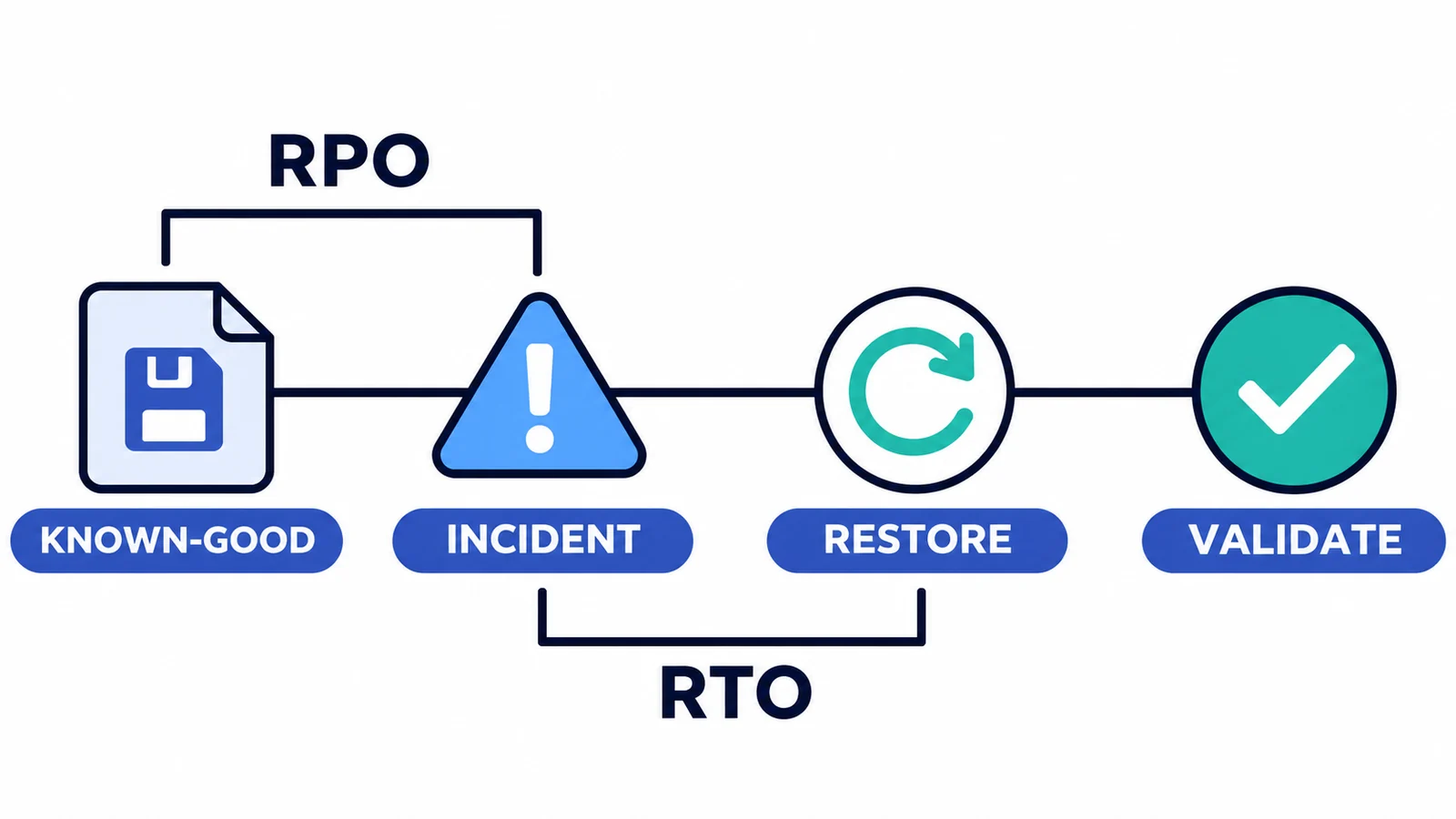
RPO looks back from the incident to the last acceptable state; RTO measures the target time from the incident to service restoration.
The table below is illustrative. Each organization should set objectives through a business impact assessment and review them with the teams responsible for the dependencies.
| Service tier | Example journey | Illustrative RTO | Illustrative RPO | Additional recovery check |
|---|---|---|---|---|
| Critical | Priority inbound support | 30 minutes | 15 minutes | Entry, routing, queue, and agent delivery |
| High | Standard customer service | 2 hours | 1 hour | IVR, lookup, routing, transfer, and escalation |
| Standard | Outbound campaign | 4 hours | 4 hours | List, dialing rules, permissions, and disposition |
| Administrative | Reporting or configuration administration | 8 hours | Previous approved business-day state | Access, data completeness, and audit evidence |
An RTO is not a promise from one tool. It depends on every required component, the authority to act, the quality of the runbook, and the time needed to verify the result.
What Must a Genesys Cloud Disaster Recovery Plan Protect?
A raw list of cloud resources is not enough. Start with the services customers use, then map the configuration and dependencies that make those services work.
Critical customer journeys
Identify the journeys that must recover first. For each one, record its entry points, IVR paths, authentication, routing, queue treatment, agent delivery, transfers, escalation, and expected outcome. Include the business owner and the test that proves the journey works.
Tenant configuration
Document the supported configuration that controls those journeys. Depending on the implementation, this may include Architect flows, queues, routing rules, skills, wrap-up codes, roles, permissions, prompts, schedules, integrations, and data actions.
The inventory should identify the approved state, current state, owner, dependencies, change history, and recovery method. Configuration auditing is especially important when the recovery decision depends on knowing which value changed and when.
External dependencies
Record telephony, internet connectivity, identity, CRM, API, endpoint, and third-party service dependencies. State who operates each dependency, where status information is available, how it is escalated, and whether a tested alternative exists.
Do not store credentials or secrets in an unsecured recovery document. Point to the approved secure access process instead.
Recovery evidence
Decide what must be retained before an incident occurs: approved configuration, before-and-after values, deployment records, test results, decision logs, owners, timestamps, and sign-off. A configuration management plan can define who maintains these records and when the baseline changes.
InProd does not operate Genesys infrastructure or recover every contact center dependency. Its role is limited to supported customer-controlled configuration and the governance evidence around those changes.
Which Failure Scenarios Should the Plan Cover?
Testing only a total regional outage leaves important risks untouched. The plan should cover provider incidents, customer-side dependencies, and mistakes made inside the tenant.
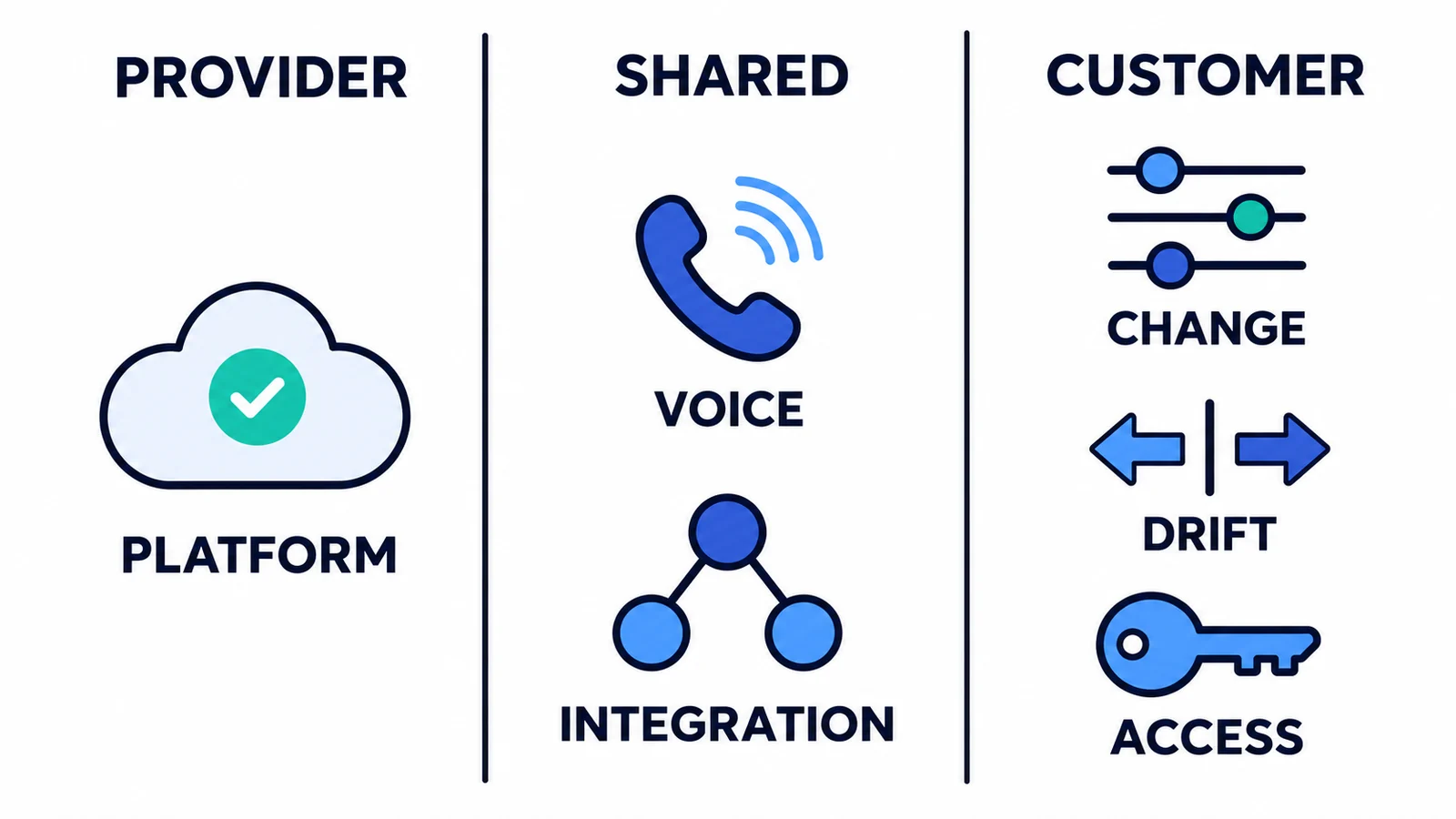
Platform recovery belongs to the provider, voice and integrations require shared coordination, and tenant changes, drift, and access remain customer responsibilities.
| Scenario | Likely symptom | Primary owner | Immediate continuity action | Recovery action | Validation evidence |
|---|---|---|---|---|---|
| Genesys platform or regional incident | Service degradation or unavailable functions | Genesys plus the customer incident team | Follow status, escalation, and approved continuity procedures | Preserve customer changes and follow the supported provider path | Vendor status plus priority journey tests |
| Internet or voice-path failure | Agents or callers cannot connect | Customer, carrier, or network provider | Activate an approved alternate path or channel | Restore or reroute the failed dependency | Test calls, agent access, and channel checks |
| Harmful flow or routing change | Misrouting, loops, or failed self-service | Customer platform team | Contain the affected path and protect critical traffic | Identify and restore or reconcile the known-good supported configuration | IVR, routing, queue, and agent-delivery tests |
| Environment drift | Production behaves differently from UAT | Customer release team | Freeze the related promotion | Compare environments and reconcile approved differences | Comparison, approval, deployment, and journey evidence |
| Integration or data-action failure | Lookup or transaction fails | Customer and integration owner | Use the designed fallback journey | Restore configuration or correct the dependency after diagnosis | End-to-end transaction test |
| Permission or access lockout | Administrators or agents lose required access | Identity and Genesys platform owners | Use the approved emergency access process | Restore the reviewed role or permission state | Access test and audit record |
The point of this matrix is not to prescribe one response for every architecture. It is to expose ownership gaps before an incident. Each row should become a tested runbook with contacts, authority, decision points, steps, and evidence requirements.
How Do You Build a Genesys Cloud Disaster Recovery Plan?
A practical cloud disaster recovery plan should produce decisions and usable records, not a document that sits untouched until an audit.
-
Identify critical customer journeys and dependencies. Start with business impact. Map each priority journey from entry point to outcome, including telephony, identity, integrations, data actions, queues, agent delivery, and external providers. The output is a prioritized service-and-dependency map.
-
Assign owners and escalation paths. Name the service owner, technical owner, incident decision maker, communications lead, vendor contacts, and approved delegates. Record who may activate continuity procedures or approve an emergency change. The output is an ownership and contact register that remains available during an outage.
-
Set RTO and RPO by journey or service tier. Use a business impact assessment to determine acceptable downtime and loss. Record dependencies and assumptions, because an internal target is not achievable when a required provider or system has a longer recovery path. The output is an approved recovery-objective register.
-
Record approved configuration and known-good states. Capture the supported configuration before production changes, connect it to approval context, and define how the team identifies the last state that passed validation. The output is an accessible, reviewed configuration history rather than a collection of screenshots and memories.
-
Define the recovery method by failure and object type. A provider incident, failed integration, bad queue edit, and permission lockout do not use the same procedure. Specify whether the response is vendor-led recovery, rollback, redeployment, manual repair, or environment reconciliation. The output is a set of object- and scenario-specific runbooks.
-
Prepare continuity alternatives. Document tested alternatives for connectivity, voice, workforce access, and customer channels where the architecture permits them. Include activation criteria and the limitations of the reduced service. The output is a continuity procedure that operators can execute without inventing it during an incident.
-
Test realistic scenarios. Exercise provider incidents, dependency failure, human error, configuration drift, harmful changes, and access loss. Include the people who make decisions and communicate, not only the engineers who operate tools. The output is a test record with actual timings, failed assumptions, and assigned improvements.
-
Validate critical customer journeys after recovery. Confirm the customer outcome, not just the availability of an administration interface. For routing and flow recovery, combine configuration checks with automated IVR testing and targeted end-to-end tests. The output is timestamped evidence linked to each recovery objective.
-
Record evidence and improve the plan. Preserve the incident timeline, decisions, changes, approvals, test results, gaps, and follow-up owners. Update the inventory and runbooks when architecture, configuration, dependencies, or responsibilities change. The output is a controlled improvement backlog and a current recovery plan.
Consider an illustrative example: an approved flow and queue change reaches production, but callers begin entering the wrong queue. The team contains the path, compares the current configuration with the last state that passed testing, reviews the dependent objects, restores or reconciles the supported configuration, then tests the entry number, menu selection, queue treatment, and agent delivery. Recovery is complete only when the journey works and the decision, change, approval, and result are recorded.
How Does Configuration Management Support Disaster Recovery?
Configuration management gives a Genesys Cloud team the state and history needed to make a recovery decision. Without it, an incident often turns into manual reconstruction: someone remembers what a queue used to contain, another person searches tickets for a screenshot, and nobody is sure whether the test environment matches production.
InProd is designed for the customer-controlled configuration layer. Configuration auditing connects supported changes to before-and-after values and history. Change Sync compares supported configuration across environments at object and parameter level, helps teams review meaningful differences, maps environment-specific values, and moves selected changes through a recorded changeset.
Together with governed Genesys Cloud DevOps and a controlled CI/CD pipeline, this supports several recovery needs:
- Identify the supported configuration change associated with an incident.
- Compare the current state with an approved or known-good state.
- Distinguish intentional environment differences from configuration drift.
- Review dependent values before restoring or reconciling a change.
- Preserve approval, deployment, and recovery evidence.
- Validate customer journeys after the configuration is recovered.
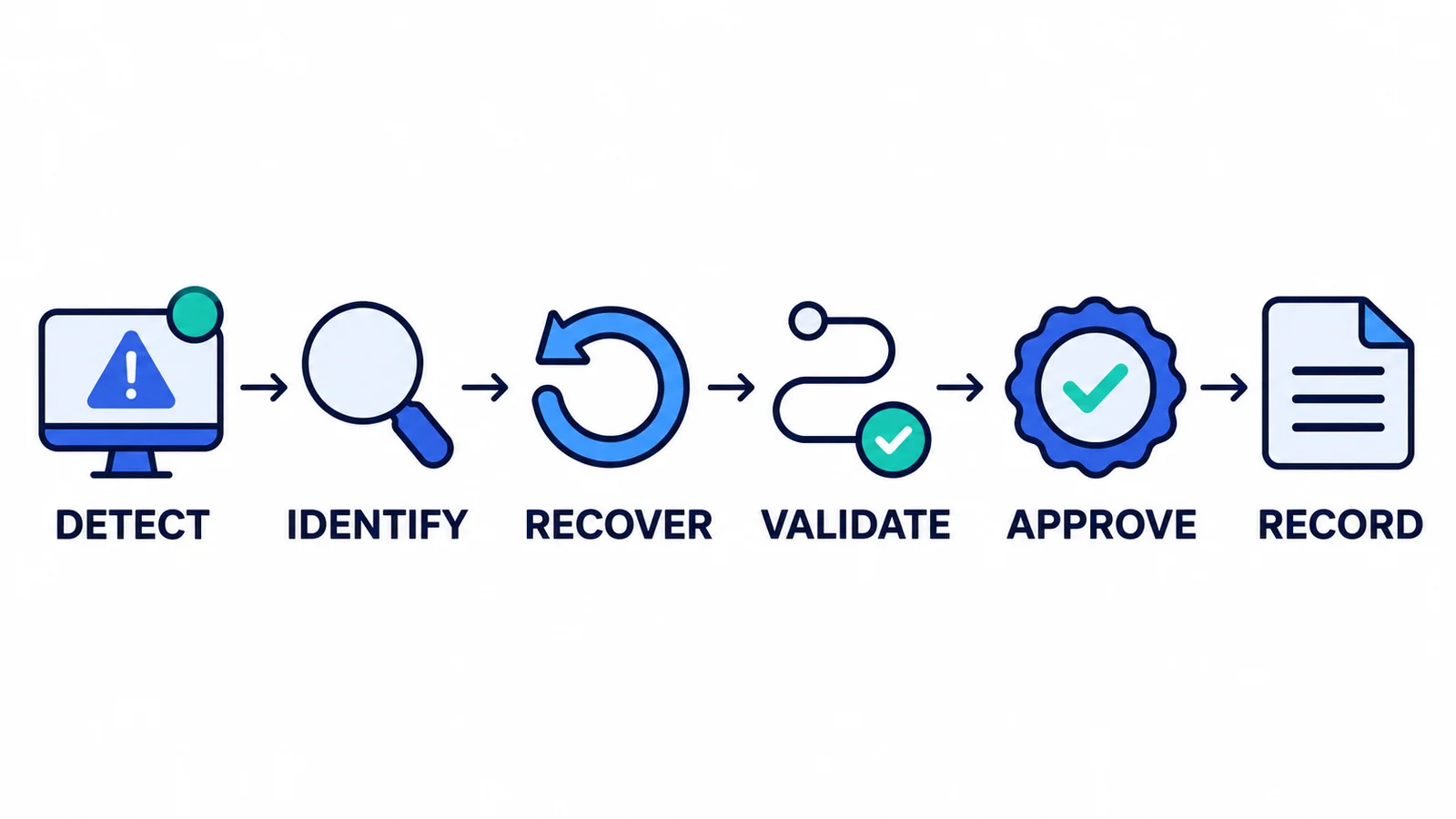
A repeatable configuration recovery workflow connects technical restoration to validation, approval, and audit evidence.
For the object-level limitations and recovery options, see Genesys Cloud rollback. Recovery procedures should be tested against the current InProd and Genesys support for each object rather than assuming one universal rollback method.
What InProd does and does not cover: InProd helps Genesys teams govern, compare, promote, and recover supported tenant configuration. It does not operate Genesys infrastructure, replace Genesys business continuity services, fail over the Genesys platform, or restore customer data and recordings.
See how InProd preserves Genesys Cloud configuration history and compares environments.
Genesys Cloud Disaster Recovery Checklist
Use this checklist to review the plan before the next exercise or material production change:
- Critical customer journeys and service tiers are documented.
- Business impact, RTO, and RPO are approved for each priority tier.
- Genesys, customer, carrier, integration, and other provider responsibilities are clear.
- Owners, delegates, contacts, escalation routes, and emergency authority are current.
- Tenant configuration and external dependencies are inventoried.
- Approved and known-good supported configuration can be identified.
- Recovery procedures exist for each important failure and object type.
- Alternative access, voice, workforce, and channel procedures are documented where applicable.
- Realistic recovery exercises have been completed.
- Post-recovery customer journey tests are defined and repeatable.
- Decisions, changes, tests, approvals, and results are retained as evidence.
- Gaps have owners and deadlines, and the plan has a review date.
The broader configuration management plan template can help define ownership, approved state, change control, evidence, and review procedures.
Frequently Asked Questions
What is cloud disaster recovery?
Cloud disaster recovery is the plan, tooling, and tested process used to restore an acceptable cloud service after disruption. It can combine resilient architecture, backup, replication, failover, configuration recovery, communications, and validation. The goal is not merely to recover data, but to restore the required business service within agreed objectives.
Does Genesys Cloud provide disaster recovery?
Genesys provides resilience and continuity controls for the Genesys Cloud platform, including a multi-availability-zone cloud architecture. Disaster recovery still involves shared responsibilities. Customers must plan for their connectivity, telephony, external dependencies, tenant configuration, operating procedures, and customer journey validation. Additional options may also depend on the customer's Genesys deployment and agreement.
What is the difference between cloud backup and cloud disaster recovery?
A cloud backup preserves recoverable data or state. Cloud disaster recovery is the complete process for restoring an acceptable service after disruption. It includes ownership, procedures, dependencies, restoration or failover, communications, testing, and evidence. A backup can support recovery, but it does not prove that a customer journey can be restored.
What are RTO and RPO?
RTO is the maximum acceptable time for restoring a service or customer journey. RPO is the maximum acceptable amount of data or state change that can be lost, usually measured in time. Both should be based on business impact and assigned to meaningful service tiers rather than applied as one number across the contact center.
How often should a Genesys Cloud disaster recovery plan be tested?
Use a risk-based schedule and test again after material changes to architecture, configuration, dependencies, ownership, or continuity procedures. Critical journeys may require more frequent exercises than lower-impact administrative services. Regulatory, contractual, or organizational requirements may set additional minimums. Each exercise should record actual recovery time, gaps, and follow-up actions.
What role does InProd play in Genesys Cloud disaster recovery?
InProd supports the customer-controlled configuration layer. It helps teams track and audit supported configuration, compare environments, govern changes, identify known-good states, and reconcile approved differences. It does not restore Genesys infrastructure, provide platform failover, replace Genesys continuity services, or recover customer data and recordings.
Does a green Genesys status page mean every customer journey is healthy?
No. The Genesys Cloud status history distinguishes platform availability from an individual customer's availability. Customer connectivity, voice paths, identity, integrations, data actions, configuration, and local dependencies can still affect a journey. Test priority journeys directly before declaring recovery complete.
What should be tested after configuration recovery?
Test the complete affected journey. Depending on the service, that can include the entry number or channel, IVR prompts and choices, authentication, integrations, data actions, routing, queue treatment, agent delivery, transfers, escalation, permissions, post-call behavior, and reporting. Record the expected result, actual result, time, environment, and approver.
Build Recovery Evidence Before the Incident
Cloud resilience, business continuity, configuration recovery, and customer journey validation are connected, but they are not interchangeable. A practical Genesys Cloud disaster recovery plan gives each layer an owner, sets objectives by business impact, protects the approved state, and proves recovery through realistic tests.
The best time to establish configuration history, known-good states, recovery procedures, and test evidence is before an outage or harmful change puts the team under pressure. Review your Genesys Cloud recovery workflow with InProd.

Jarrod Neven
Contact Center Expert, Director at InProd Solutions
Jarrod has been working in the enterprise CX space since 2001. Before starting InProd, he spent several years as a CTI Solutions Architect at Genesys itself, working across the APAC region with enterprise and government customers, which gives him a different perspective on how their platforms actually work under the hood. He's been Director at InProd Solutions since 2016, helping organizations cut through the complexity of Genesys Engage deployments.