
GitOps Workflows: How They Work (and Where They Apply)
A GitOps workflow manages infrastructure and application configuration using Git as the single source of truth. Instead of engineers logging into a system and changing settings directly, every change is written as declarative code, reviewed like any other code change, and automatically applied by a tool that continuously keeps the live environment in sync with what's defined in Git.
GitOps was popularized by the Kubernetes community, and most of what's written about it treats that as the whole story: GitOps is Kubernetes tooling, full stop. That's true of the tools. It's not true of the model. Declarative state, peer-reviewed changes, and automatic drift correction are a general pattern for managing configuration safely; Kubernetes was just the first place it got a name and a toolchain. This guide covers how a GitOps workflow actually works, why teams adopt it, and where the same underlying model applies to systems that have nothing to do with containers at all.
The Core Phases of a GitOps Workflow
A GitOps workflow follows a consistent sequence, whether it's managing a single cluster or a global, multi-environment deployment.
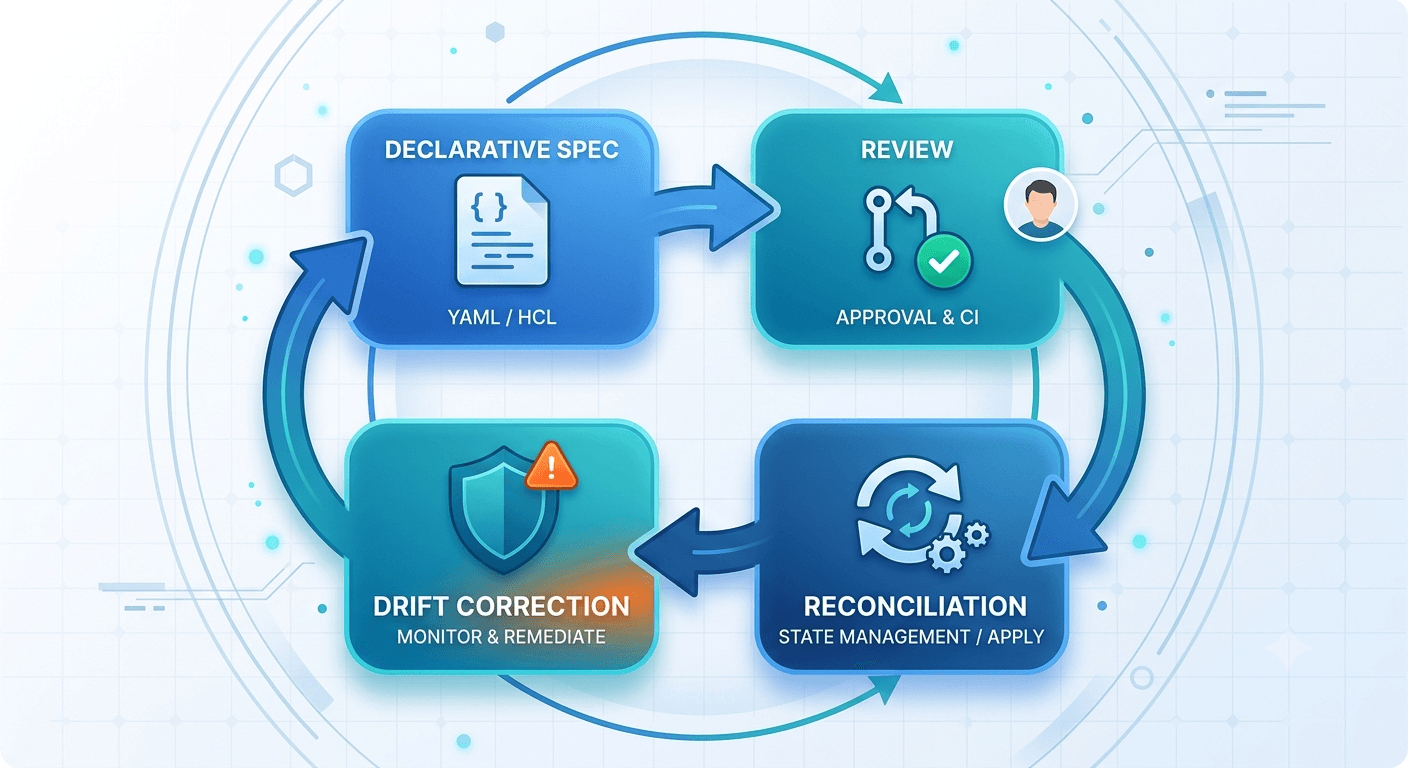
Declarative specification. The desired state of the system, whether infrastructure, application configuration, or both, is defined declaratively as code and stored in version control. This is the foundational shift GitOps makes: instead of describing the steps to reach a state (imperative, "run this command, then that one, in this order"), you describe the state itself (declarative, "this is what the system should look like") and let tooling figure out how to get there. A Kubernetes deployment manifest is the canonical example: it doesn't say "start three containers," it says "there should be three replicas of this container running," and the cluster continuously works to make that true.
Pull request and review. Changes don't go straight to production. A developer or administrator creates a branch, makes the change, and submits a pull request. That PR goes through peer review, automated testing, and compliance checks before it's merged: the same process software teams already use for application code, applied to infrastructure and configuration instead. This is what separates GitOps from simply "storing config in a repo": the review step is what makes every change accountable to someone other than the person who made it, before it ever reaches a live system.
Automated reconciliation. Once a change is merged, a GitOps operator, usually Argo CD or Flux, continuously monitors the Git repository and automatically pulls the latest state, syncing it with the live environment. Nobody manually applies the change; the operator does it, consistently, every time, using the same process regardless of who wrote the change or which environment it's targeting. This is also what makes GitOps genuinely different from a typical CI/CD pipeline that pushes changes out: in GitOps, the operator inside the environment pulls the change, rather than an external system pushing credentials in to apply it.
Drift detection and correction. This is arguably the most distinctive part of the model. The GitOps operator doesn't just apply changes; it continuously compares the declared state in Git against the actual state of the running system. If someone makes a manual change directly to the live environment, bypassing Git entirely (an emergency fix, a well-meaning but undocumented tweak, a leftover debugging change nobody reverted), the operator detects that discrepancy and automatically reconciles it, reverting the environment back to match what's declared in Git. Configuration drift, in other words, gets corrected automatically instead of silently accumulating until someone notices something's wrong months later.
Why Teams Adopt GitOps: The Core Benefits
The mechanics above translate into a handful of concrete advantages over manually managing infrastructure or configuration.
Auditability and traceability. Every change is recorded in Git's commit history, creating an immutable log of who changed what, when, and why through commit messages and linked PRs. This is a byproduct of the workflow, not a separate system someone has to remember to update. When something breaks, the answer to "what changed" is a git log, not a guessing game across Slack threads and memory.
Instant rollback. If a deployment causes a problem, reverting is a Git operation: revert to a previous commit, and the GitOps operator automatically syncs the environment back to that known-good state. There's no manual reconstruction of what the environment used to look like, and no risk that the rollback itself introduces a new inconsistency; the operator applies the reverted state with the same reliability it applies any other change.
Reduced access risk. Because the GitOps operator is what actually applies changes to the live environment, individual developers don't need standing write access or direct credentials to the infrastructure itself. That significantly narrows the security exposure compared to a model where any admin with console access can make a live change; there's no credential to leak or misuse, because the humans in the loop never hold one.
Consistency across environments. The same declared state can be applied to development, staging, and production identically, removing the manual re-entry and human error that causes environments to quietly diverge from one another over time. A change tested in staging is, by construction, the exact same change that reaches production, not a manually recreated approximation of it.
GitOps Tools: Argo CD, Flux, and the Kubernetes-Native Ecosystem
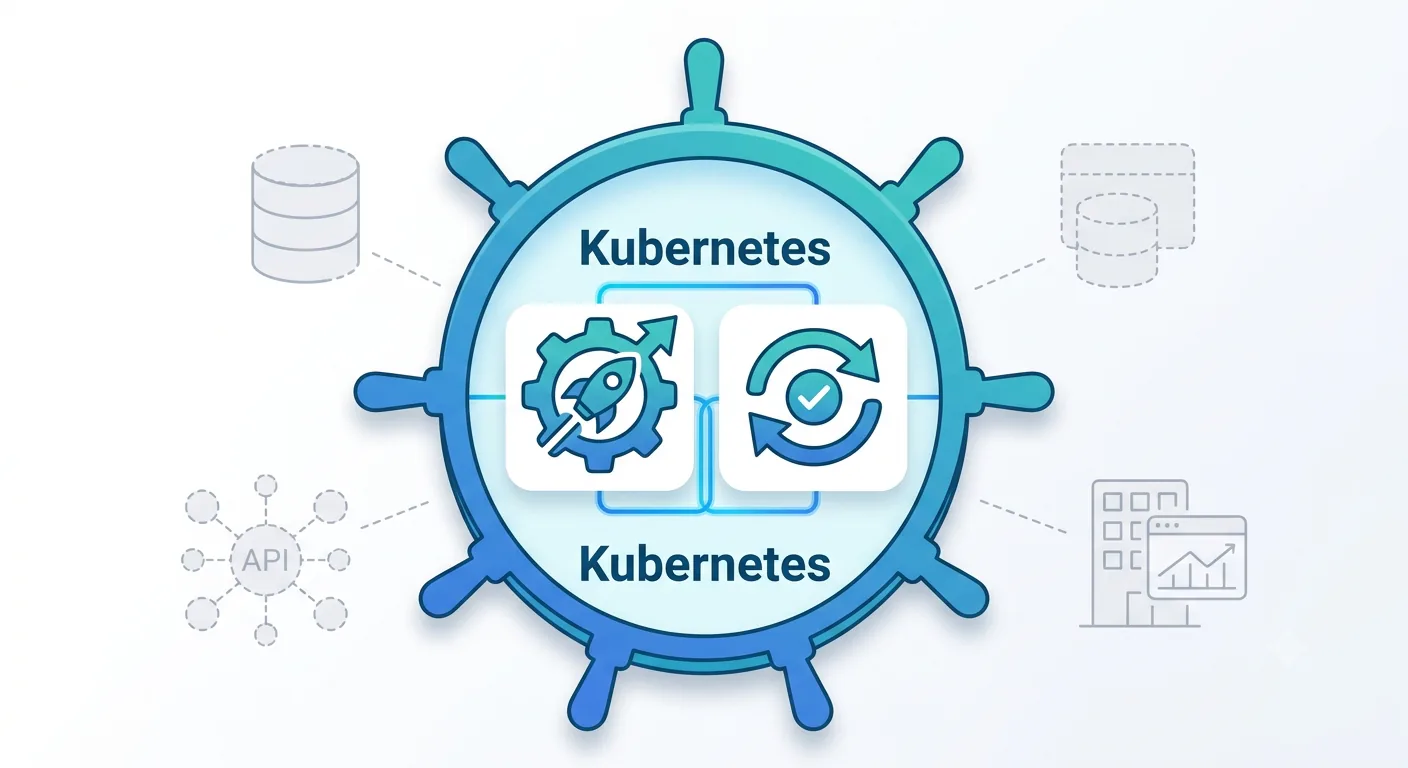
The tooling that makes GitOps workflows possible today is built specifically for Kubernetes. Argo CD and Flux are the two dominant GitOps operators: both run inside a Kubernetes cluster, both watch a Git repository, and both handle the reconciliation and drift-correction work described above. Choosing between them typically comes down to factors like multi-cluster management needs, UI preferences, and how deeply integrated a team wants the tool with the broader Kubernetes ecosystem.
Teams adopting either tool also have to decide how to structure the Git repository itself, commonly framed as mono repo versus multi-repo. A mono repo keeps all environments and applications in a single repository, which simplifies visibility but can make access control more coarse-grained. A multi-repo approach splits configuration across several repositories, often by environment or team, trading some visibility for tighter, more granular access boundaries. Neither is universally correct; the right structure depends on team size, how many environments are in play, and how much isolation different teams need from each other's changes.
This is also where most explanations of GitOps stop, reasonably, since that's where the tooling lives today. But the tools being Kubernetes-specific doesn't mean the underlying model is.
Where the GitOps Model Applies Beyond Kubernetes
Strip away the Kubernetes-specific tooling, and GitOps is really an operating model with four properties: state is declared, not clicked into existence; changes are reviewed before they take effect; deployment is automated and consistent; and drift between what's declared and what's actually running gets caught and corrected. None of those four properties are inherently about containers.
Any system that meets three conditions is a reasonable candidate for the same model, whether or not it runs on Kubernetes: it has configuration that can drift from its intended state, more than one person can change that configuration, and the cost of an unreviewed or undocumented change is meaningful. Financial systems, network infrastructure, SaaS platform configuration, and enterprise software with rich configuration layers all meet that bar just as clearly as a Kubernetes cluster does.
Genesys Cloud contact center configuration is a clear example. Routing rules, Architect flows, integrations, and queue definitions are all configuration that multiple admins can change, that drifts between environments over time, and where an unreviewed change can misroute customer interactions in production. It has every property that makes GitOps valuable. It just doesn't run on Kubernetes, and Argo CD and Flux have no concept of a Genesys Cloud API object. The model transfers. The tooling doesn't, at least not natively.
Applying GitOps Principles to Genesys Cloud Configuration
Mapping the four GitOps phases onto Genesys Cloud configuration makes the parallel concrete:
- Declarative specification becomes configuration as code: Genesys Cloud objects defined in version-controlled JSON or YAML instead of configured by hand through the UI.
- Pull request and review becomes changesets: bundled, reviewable units of configuration change that go through approval before deployment, the same review discipline a Kubernetes manifest change would get.
- Automated reconciliation becomes environment promotion: a validated changeset moving from development through UAT into production automatically, rather than being manually re-entered in each environment.
- Drift detection and correction becomes Change Sync: continuously comparing environments against their intended state and surfacing (or correcting) discrepancies before they cause an incident.
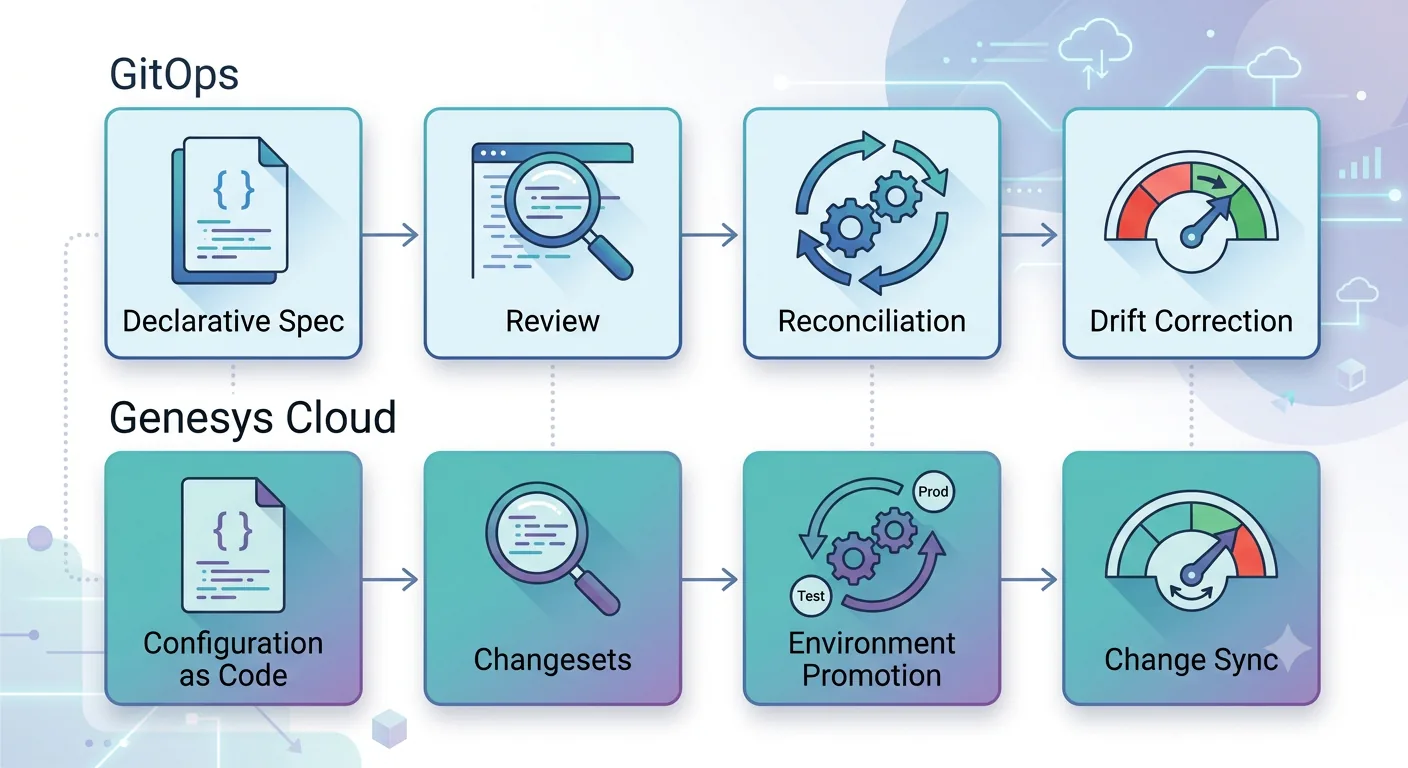
This isn't running Argo CD against Genesys Cloud; the platforms and APIs are too different for that to work directly. It's applying the same proven model to a platform that has every reason to need it and no native tooling that provides it. For a deeper look at how this works end to end, see our complete guide to Genesys change control.
Frequently Asked Questions
What is a GitOps workflow? A GitOps workflow is a method of managing infrastructure and configuration using Git as the source of truth. Changes are declared as code, reviewed through pull requests, and automatically applied and reconciled by an operator that keeps the live environment in sync with Git.
Is GitOps the same as DevOps? No. DevOps is a broader cultural and operational philosophy around collaboration between development and operations teams. GitOps is a specific implementation pattern, using Git and automated reconciliation to manage infrastructure, that puts some DevOps principles into practice with a defined workflow.
What are the four pillars of GitOps? Declarative specification, pull request and review, automated reconciliation, and drift detection and correction. Together they define how a GitOps workflow moves a change from proposal to live, verified state.
Does GitOps only work with Kubernetes? The dominant tools, Argo CD and Flux, are built specifically for Kubernetes, but the underlying model (declarative state, reviewed changes, automated sync, drift correction) isn't Kubernetes-specific. It applies to any system where configuration can drift, multiple people can change it, and unreviewed changes carry real risk.
Can GitOps principles apply to non-Kubernetes systems? Yes, though it typically requires purpose-built tooling rather than Argo CD or Flux directly, since those operators are designed around Kubernetes' API model. Platforms like Genesys Cloud, which have rich configuration layers but aren't container-based, need tools built specifically for their API to apply the same declarative, reviewed, drift-corrected workflow.
What's the difference between GitOps and a traditional CI/CD pipeline? In a traditional CI/CD pipeline, changes are typically pushed to the target environment by an external system that holds deployment credentials. In GitOps, an operator running inside the target environment pulls changes from Git on its own schedule, rather than being pushed to. That pull-based model is part of what enables continuous drift detection: the operator is always comparing its own environment against Git, not just reacting when a deployment is triggered.
How does drift detection actually catch unauthorized changes? The GitOps operator continuously polls or watches both the Git repository and the live environment, comparing the two. If a manual change is made directly to the environment, bypassing Git entirely, the next reconciliation cycle detects the mismatch between declared and actual state and can either alert on it or automatically revert the environment back to match Git, depending on how the operator is configured.
See how InProd brings GitOps-style release governance to Genesys Cloud DevOps →

Jarrod Neven
Contact Center Expert, Director at InProd Solutions
Jarrod has been working in the enterprise CX space since 2001. Before starting InProd, he spent several years as a CTI Solutions Architect at Genesys itself, working across the APAC region with enterprise and government customers, which gives him a different perspective on how their platforms actually work under the hood. He's been Director at InProd Solutions since 2016, helping organizations cut through the complexity of Genesys Engage deployments.