
Genesys Engage License Monitoring and Usage Reporting
A license renewal is approaching, another team needs access, or a platform review asks how much Genesys capacity the business uses. You have agent records, staffing figures and a usage report, but the numbers describe different things.
Genesys Engage license monitoring helps you examine consumption for a defined license type and population. A useful review starts by establishing what the report measures, which agents it covers and what period it represents. Those details determine whether a figure can support the decision in front of you.
This guide explains how to validate and interpret agent-based license reporting in InProd. It includes an illustrative report, a business-unit reconciliation example and a checklist you can use before sharing results with operations, finance or procurement.
What Genesys Engage license monitoring measures
Start by separating the measurement from the entitlement. A configured agent population, a usage result and a purchased quantity can each be correct while answering different questions.
| Term | What it describes | Question it helps answer |
|---|---|---|
| Purchased entitlement | The rights, quantities and conditions in the applicable agreement and order | What has the organization purchased? |
| Enabled usage | Agents qualifying under the selected configuration-based license definition | Which agents qualify at collection time? |
| Concurrent usage | Usage calculated under the selected concurrent definition using relevant events | What consumption does this model report? |
| Business-unit allocation | Consumption attributed to organizational groups | How is reported usage distributed internally? |
Genesys distinguishes contractual licensing from technical license controls and usage reporting in its licensing concepts documentation. A technical license key alone does not explain every contractual entitlement.
Apply the same discipline to comparisons. A total of agent records is not automatically the enabled count for a particular product. An average cannot answer a question about a peak. Logged-in activity should not be interpreted as time spent handling interactions.
Record the definition beside the result. A number without its scope is difficult to explain and easy to reuse incorrectly.
How InProd collects usage data
InProd supports enabled and concurrent agent-license reporting. Enabled figures use configuration at collection time; concurrent reporting incorporates usage events. Its Stat Server Connector collects login/logout events for configured agent groups. Agents outside those groups are excluded from that collection.
Reporting can be allocated by business unit and delivered in HTML, Excel or CSV. The reporting architecture documentation describes the collection components and their relationships.
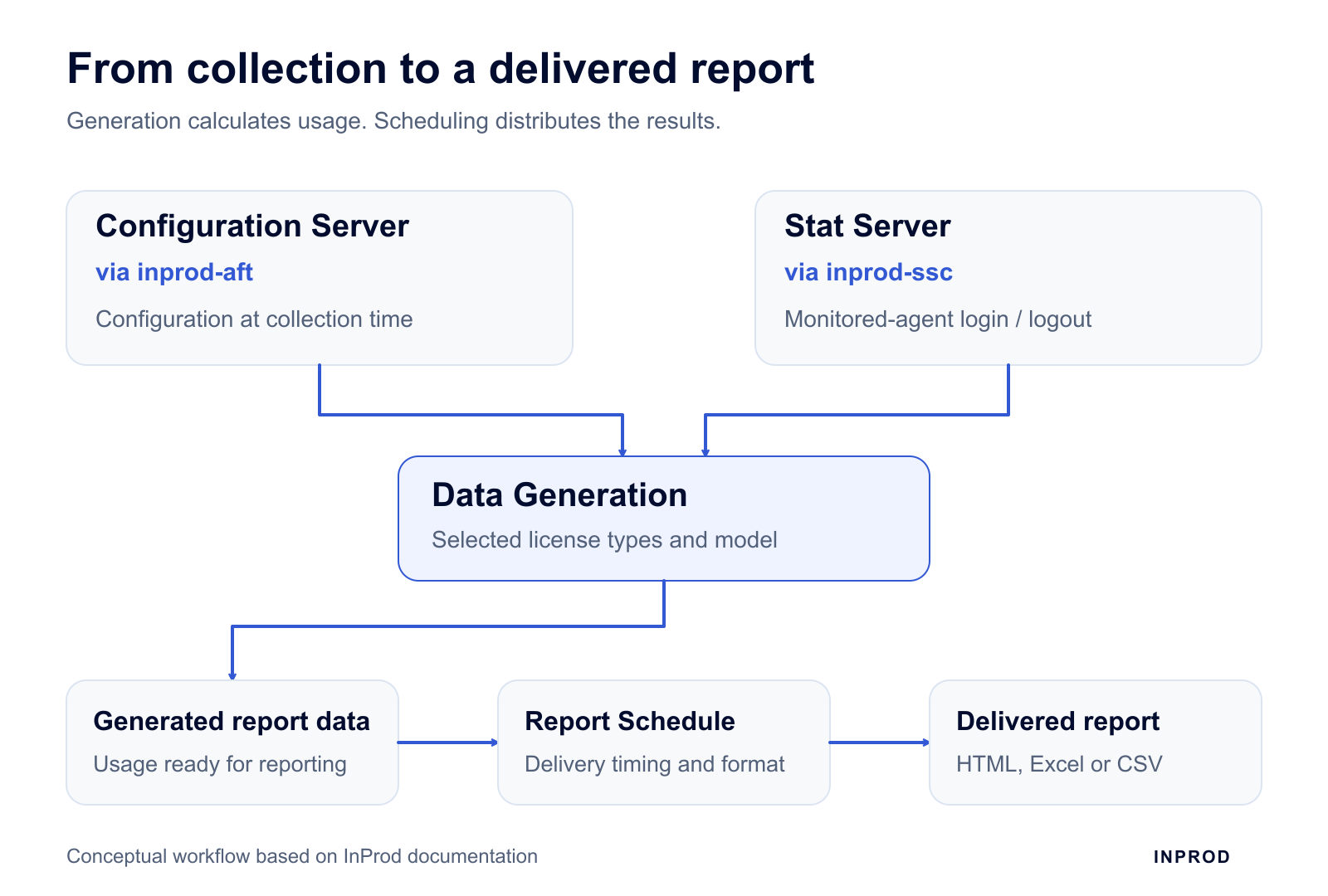
Configuration and event collection feed usage generation; scheduling delivers the generated data. View the architecture documentation.
For an operator, the practical implication is that a delivered report needs a collection context. Establish the selected population and model before treating its totals as representative of the contact center.
Validate coverage before reading the totals
A plausible result can still describe an incomplete population. Validate the inputs first, particularly when a team, site or agent group has recently changed.
Define the reporting scope
Write down the environment, tenant, selected license definition, consumption model and period under review. Identify the business question too: a departmental allocation review may need a different view from an investigation into an unexpected usage increase.
Use stable identifiers alongside names when comparing agent populations. A renamed group or similarly named object should not make two reports appear comparable when their scope differs.
Check the expected population
Compare the agents you expect to qualify with the population represented in the report. For concurrent collection, check monitored-group coverage separately from business-unit membership. An agent can be assigned correctly for departmental reporting while sitting outside the collection scope.
Include recent joiners, transfers and newly introduced groups in this check. A low result deserves investigation if it coincides with a population change.
Validate generation before distribution
In InProd, license types and consumption models must be selected in Data Generation; none are processed by default. Report Schedule distributes existing usage data. Test Run exports validation data with resource DBIDs to Excel without saving that generated test data. See the Data Generation reference.
Use those identifiers to compare expected resources and investigate allocation. A successful test is useful evidence about the configuration being checked; it does not establish complete historical event coverage.
Record changes that affect comparisons
If a definition, reporting population or consumption model changes, record when and why. A difference between two periods may reflect a measurement change as well as an operational change.
This is especially relevant when configuration as code forms part of the Engage operating model. Keep enough context to explain the reporting scope at the time a result was produced.
Read the report in its operational context
Before presenting a total, prepare a short description of the result. The example below uses hypothetical data for one enabled-license observation. Every agent included qualifies for the selected definition.
| Report detail | Illustrative value | How to interpret it |
|---|---|---|
| Environment | Production | The observation concerns this environment |
| Tenant | Example tenant | Other tenants are outside this example |
| License definition | Selected agent-based license | The total applies to this definition |
| Consumption model | Enabled | It is not a concurrent-usage result |
| Observation | One stated collection time | It does not establish usage throughout a month |
| Overall usage | 13 qualifying agents | This is the population to reconcile |
| Business-unit allocation total | 12 | One qualifying agent has no unit allocation |
The difference between 13 and 12 is a question to investigate, not an immediate indication that either number is wrong.
For a concurrent report, retain the reported consumption model and observation period. Do not substitute the enabled population or calculate an undocumented concurrent peak from this example.
When comparing reports, first align the definition, scope, model and period. If those differ, explain the difference before discussing a trend. This prevents a presentation from treating unlike figures as evidence of growth, decline or spare capacity.
Reconcile usage by business unit
Business-unit reporting adds an allocation question to the usage question: where should consumption be attributed?
InProd divides an agent's usage evenly across their configured business units. Agents without a business-unit assignment prevent allocated totals from matching overall usage. This behavior is described in the Business Unit documentation.
Consider the same hypothetical enabled report:
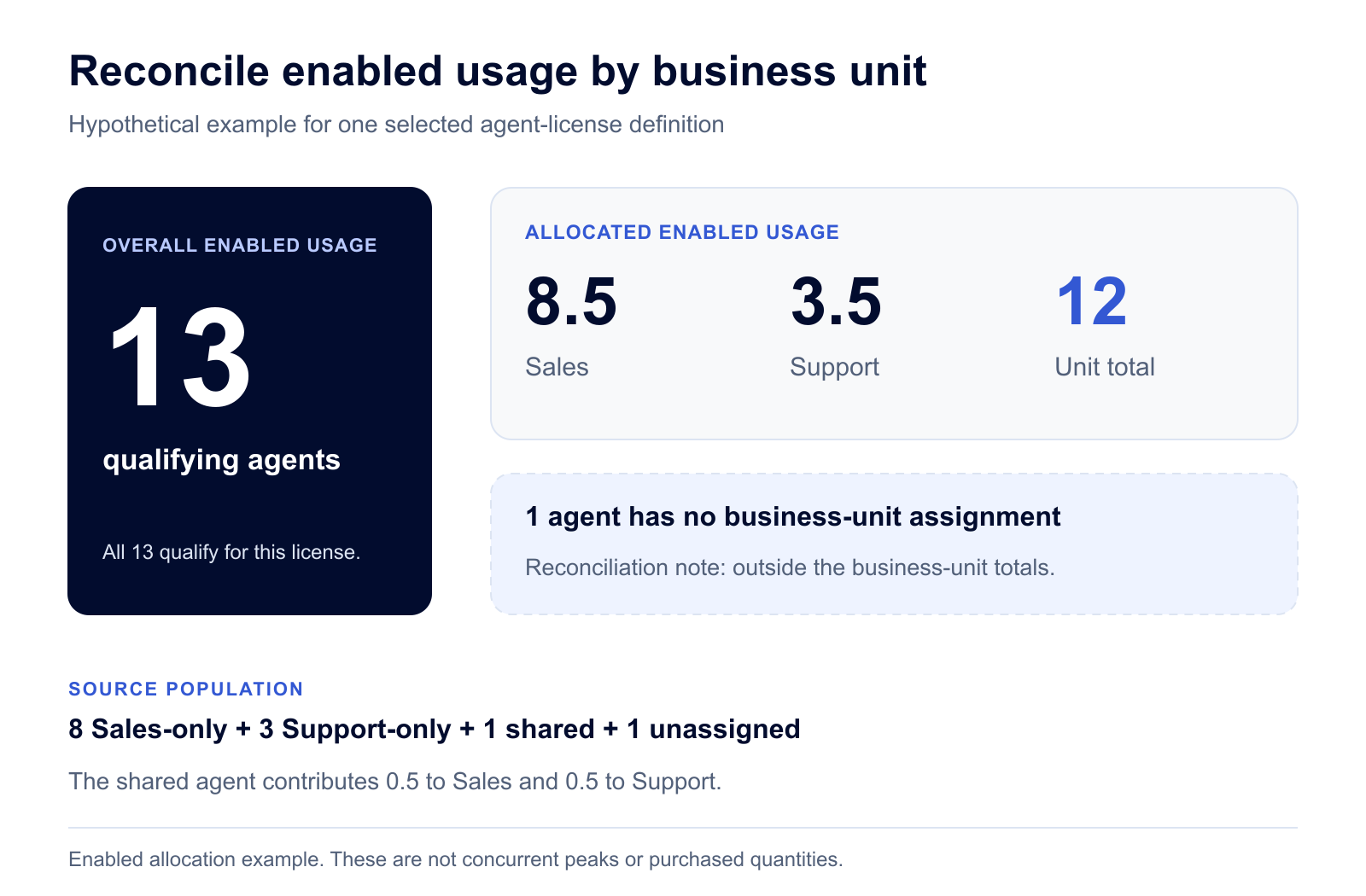
Illustrative enabled usage: 13 qualifying agents, 12 allocated units and one unassigned agent. Read the business-unit reporting reference.
| Agent allocation | Qualifying agents | Sales allocation | Support allocation |
|---|---|---|---|
| Sales only | 8 | 8 | 0 |
| Support only | 3 | 0 | 3 |
| Shared equally between Sales and Support | 1 | 0.5 | 0.5 |
| No business unit assigned | 1 | 0 | 0 |
| Total | 13 | 8.5 | 3.5 |
Sales and Support add up to 12. The remaining agent explains the difference from the overall total of 13. The half units arise from the shared agent; they are allocation values, not half an agent account.
If the organization expects every qualifying agent to belong to a unit, investigate the unassigned record and validate the next result. If that population is intentionally unallocated, explain it when distributing the report.
This example concerns enabled allocation. It does not describe concurrent peaks or purchased quantities.
Prepare a capacity or renewal review
A useful review should make the measurement easy to assess. Include the report, its scope, known collection limitations and the operational assumptions behind the decision.
For capacity planning, consider representative conditions. A quiet observation may be accurate while telling you little about shift overlap, seasonal demand or planned staffing changes. Connect the evidence to the assumptions in your contact-center planning, and identify which conditions the observation covers.
For a renewal discussion, compare the selected usage definition with the corresponding purchased entitlement and applicable counting rules. Resolve mismatches before presenting a recommendation.
Use a short review record:
- The license definition and consumption model examined.
- The environment, tenant and period covered.
- The reported result and population checks performed.
- Unassigned or excluded populations requiring explanation.
- Planned operational changes and questions still to resolve.
A usage report can inform a decision. It does not, by itself, establish how many licenses the organization should purchase or demonstrate that a reduction is appropriate.
Investigate incomplete or unexpected reports
Treat unexpected totals as a reason to inspect the reporting scope and process before changing the operational conclusion.
| Symptom | What to investigate |
|---|---|
| An expected agent is missing | Eligibility under the selected definition, relevant collection-group membership and the observation time |
| No usage appears | Environment and tenant selection, configured generation, selected license types and the requested period |
| A report arrives but the expected period is absent | Available generated data, report date range and collection or delivery timing |
| Departmental totals differ from overall usage | Unassigned agents and the allocation population |
| A total changes sharply | Definition, model, population and operational changes between observations |
Keep the report and the relevant configuration context together while investigating. If you correct a scope problem, distinguish results produced before and after that correction. Avoid presenting the combined series as a continuous measurement without explaining what changed.
Genesys Engage license reporting checklist
Before sharing a report, confirm that:
- The environment and tenant are identified.
- The license definition and consumption model are explicit.
- The period or collection time answers the intended question.
- Expected agent populations have been checked.
- Concurrent collection coverage has been examined where applicable.
- Business-unit assignments and unexplained differences have been reviewed.
- Measurement changes are recorded alongside comparisons.
- Any proposed entitlement comparison uses the corresponding definition.
- Illustrative data is clearly separated from operational evidence.
Keep this checklist with the report so another person can understand how the result was assessed.
Frequently asked questions
Is enabled usage the same as the number of agent accounts?
No. The relevant population is the set qualifying for the selected license definition. Establish that definition before comparing the result with an account inventory.
Why might an agent be missing from a concurrent report?
Check the collection scope and eligibility described above, including monitored-group membership. Then investigate the relevant observation period and event collection.
Why do business-unit reports contain fractions?
Shared allocation can produce fractions. The worked example shows how one qualifying agent contributes 0.5 to each of two units.
Does scheduling a report create usage history?
Scheduling and generation serve separate purposes. Check that the required generated data exists for the period you want to distribute.
How does InProd reporting relate to Genesys License Manager and LRM?
Technical enforcement, reporting and contractual entitlement are separate concerns. Genesys has its own License Reporting Manager documentation. Use each tool's supported scope and definitions when deciding how to use its output.
Can a usage report prove that we should reduce our license quantity?
That conclusion requires a matching entitlement, representative evidence and consideration of planned demand. A low observation alone is insufficient.
Review your Engage license reporting setup
If your team needs a clearer view of collection coverage, consumption models or business-unit allocation, book a conversation with InProd to discuss your Genesys Engage reporting setup.

Jarrod Neven
Contact Center Expert, Director at InProd Solutions
Jarrod has been working in the enterprise CX space since 2001. Before starting InProd, he spent several years as a CTI Solutions Architect at Genesys itself, working across the APAC region with enterprise and government customers, which gives him a different perspective on how their platforms actually work under the hood. He's been Director at InProd Solutions since 2016, helping organizations cut through the complexity of Genesys Engage deployments.