
DevOps for Enterprise & Mission-Critical Systems
DevOps has transformed how modern software teams build and deliver software. But while the tooling and terminology have become widely understood, the actual processes, including how teams coordinate work, manage change, and maintain stability in high-stakes environments, remain less well-documented.
This guide covers the DevOps lifecycle in depth, examines the core components that make it work, and addresses a risk that is often underemphasized: the danger of manual changes in environments where a single misconfiguration can cause significant outages.
The DevOps Lifecycle
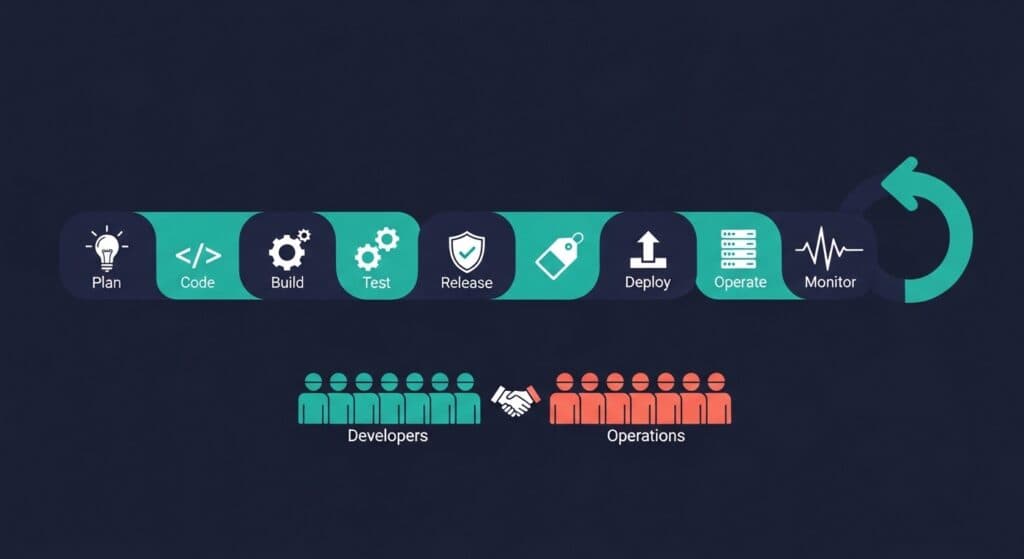
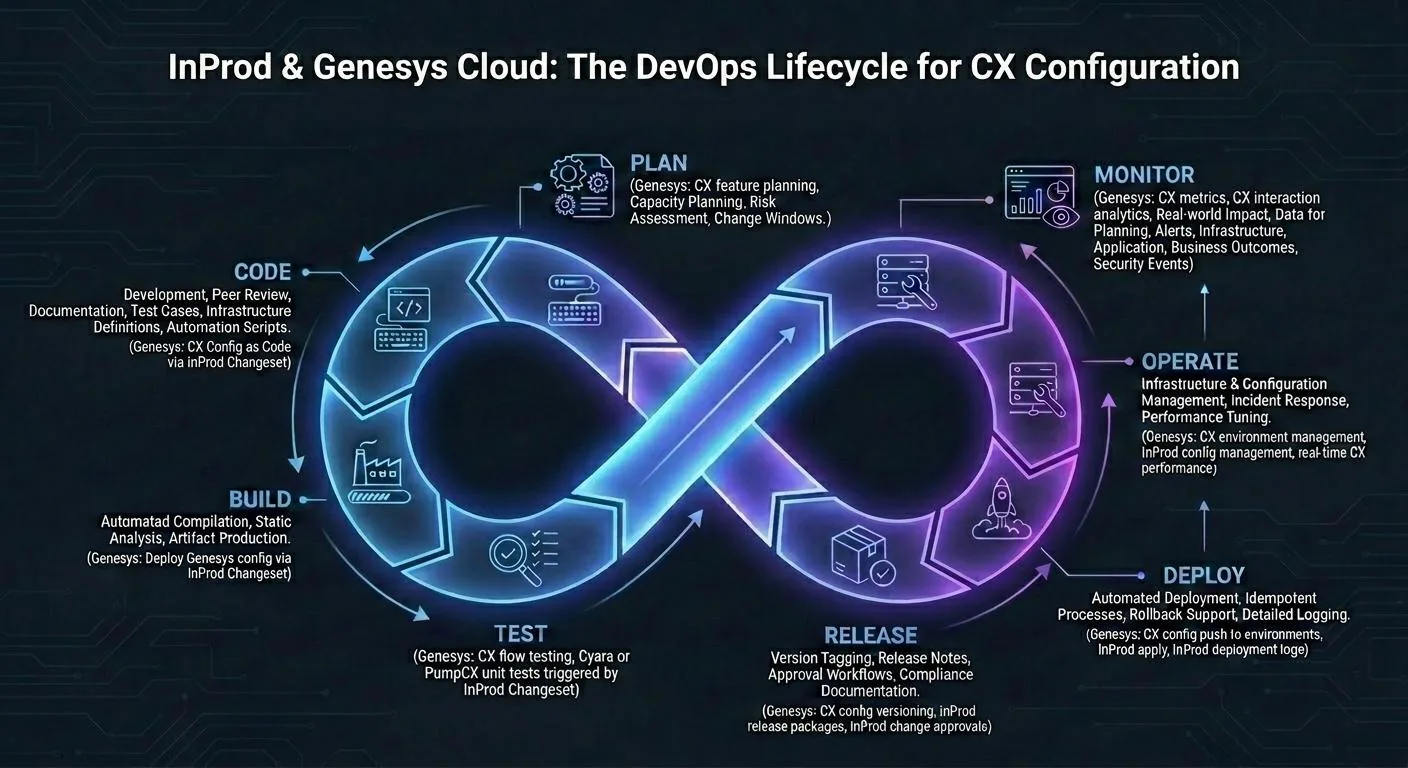
DevOps is often represented as an infinite loop of eight phases. This is a useful mental model, but the phases are not strictly sequential; in mature teams, they operate continuously and simultaneously across many work streams.
Plan
Planning in DevOps extends beyond project management. It encompasses sprint planning for feature development, change management planning for upcoming deployments, capacity planning for infrastructure, and risk assessment for changes that touch critical systems.
For mission-critical environments, planning also means defining change windows, scheduled periods when deployments are permitted, and coordinating across teams so changes do not compound each other's risk.
Code
The code phase covers all activities related to writing, reviewing, and managing code: development work, peer code review, documentation, and test case development. In a true DevOps culture, operations engineers contribute to code as well, writing infrastructure definitions, deployment scripts, and automation.
Build
Automated build systems compile code, run static analysis, and produce artifacts ready for testing. Successful builds produce consistent, reproducible outputs. Failed builds surface problems before they progress further through the pipeline.
Test
Automated testing in DevOps operates at multiple levels: unit tests that verify individual functions, integration tests that verify component interactions, end-to-end tests that verify complete user flows, and performance tests that verify system behavior under load. The goal is catching defects as early as possible, where they are cheapest to fix.
Release
The release phase manages the transition from a tested artifact to a deployable package. It includes version tagging, release notes, approval workflows, and, for regulated environments, compliance documentation. In many organizations, this is where human oversight is most concentrated.
Deploy
Deployment automation carries release artifacts into target environments. Effective deployment processes are idempotent (running them multiple times produces the same result), support rollback, and generate logs that capture exactly what changed and when.
Operate
Operations encompasses everything involved in keeping the system running: infrastructure management, configuration management, incident response, and performance tuning. In DevOps, operations engineers work closely with development teams, sharing context about production behavior that shapes future development priorities.
Monitor
Monitoring closes the loop. It surfaces the real-world impact of changes, generates data for planning decisions, and triggers alerts when behavior deviates from expectations. Effective monitoring covers infrastructure metrics, application behavior, business outcomes (such as conversion rates or error rates per user), and security events.
Core Components of DevOps Processes
Continuous Integration (CI)
CI means integrating code changes frequently, at least daily, into a shared repository, with automated builds and tests running on every commit. The goal is to surface integration conflicts and defects quickly, while the context is fresh for developers.
Key CI practices include: trunk-based development (or short-lived feature branches), automated build triggers on every push, fast feedback loops (test suites that complete in minutes rather than hours), and mandatory test passing before merging.
Continuous Delivery / Continuous Deployment (CD)
CD extends CI by automating the delivery of tested code through staging environments and, where appropriate, all the way to production. Continuous delivery means the pipeline produces deployable artifacts at any time. Continuous deployment means those artifacts are deployed automatically without manual intervention.
In mission-critical environments, continuous deployment to production is often not appropriate. Continuous delivery, maintaining the capability to deploy on-demand with a human approval gate before production, is a more common pattern for systems where outages have significant consequences.
Infrastructure as Code (IaC)
IaC treats infrastructure configuration as software: version-controlled, reviewed, tested, and deployed through automated pipelines. Tools like Terraform, Ansible, and Pulumi define infrastructure state declaratively, enabling consistent provisioning across environments and reliable rollback when something goes wrong.
The same principle applies to platform configurations that are not traditional infrastructure: contact center routing logic, CRM workflows, API gateway configurations. Anything that can be defined in structured format can be managed as code.
Automation and Feedback
Automation in DevOps serves a dual purpose: it removes humans from repetitive, error-prone tasks, and it generates feedback that humans can act on. Automated tests generate feedback about code quality. Automated deployments generate feedback about deployment reliability. Automated monitoring generates feedback about production behavior.
The feedback loop is what enables continuous improvement. Without it, teams operate blind, making changes and hoping for the best.
The DevOps Process Flow
A mature DevOps pipeline connects these components into a coherent flow:
- A developer pushes code to version control
- CI triggers: the build system compiles and tests the change
- If tests pass, the artifact is promoted to a staging environment
- Automated and manual tests run in staging
- Approved changes enter the release queue
- Deployment automation carries the release to production on schedule
- Monitoring verifies post-deployment behavior
- Metrics feed back into planning for the next cycle
In high-maturity teams, this entire flow takes hours or days, not weeks. Low-maturity teams often have the same nominal process but spend most of their time on manual coordination, environment troubleshooting, and post-incident recovery, rather than on the work itself.
DevOps in Enterprise and Mission-Critical Environments
Enterprise and mission-critical environments introduce constraints that simpler environments do not face. Change management processes require documentation, approval, and sign-off before changes reach production. Compliance requirements mandate audit trails of every system modification. Availability requirements mean that even brief outages carry significant business and reputational cost.
These constraints do not make DevOps impossible. They make it more important.
Without DevOps discipline, enterprise teams typically compensate for the risk of manual change management by changing less frequently, which leads to larger, riskier releases, longer feedback cycles, and more difficult rollbacks. The lower change velocity creates the illusion of stability while the actual risk accumulates.
With DevOps discipline, enterprise teams change frequently in small increments, each of which is tested, documented, and reversible. The higher change frequency is safer, not riskier, because each individual change is smaller and better controlled.
The Hidden Risk: Manual Changes and Misconfiguration
This is the dimension of DevOps risk that receives the least attention in most practitioner literature.
Industry data consistently shows that 80% of production outages in complex IT and telecommunications environments are caused by change-related issues, not by hardware failure, capacity exhaustion, or external events.
The mechanism is straightforward. A manual change to a production system introduces a discrepancy between what was intended and what was actually configured. In complex environments with many interdependent components, that discrepancy can propagate through the system in ways that are not immediately visible. The failure mode may not activate until a specific code path is hit, hours later, under specific traffic conditions, after a follow-on change interacts with the first.
Manual changes are particularly dangerous because they are often:
- Undocumented: made urgently, without going through formal change management
- Untested: validated only in the mind of the person making them
- Irreversible without effort: because no structured rollback procedure was defined
- Invisible in retrospect: because audit trails were not maintained
In contact center environments specifically, where routing logic, IVR configurations, and queue definitions directly determine whether customers reach the right agent, a single misconfiguration can affect thousands of interactions before it is detected.
Automating Change Control with Changeset-Based Deployment
The solution to manual change risk is structured change automation. Rather than executing changes directly against production systems, teams define changes as structured artifacts, changesets, that are reviewed, tested in non-production environments, and deployed through automated pipelines with automatic rollback capability.
This approach provides several guarantees that manual processes cannot:
Consistency: the same changeset that was tested in UAT is the changeset deployed to production. There is no manual reproduction step where configuration can drift.
Auditability: every deployment generates a record of what changed, when, who approved it, and what the previous state was.
Rollback: because the changeset is a defined artifact, reverting it is a structured operation, not an improvised reconstruction of what was manually changed.
Environment promotion: changes flow through environments in a defined sequence, with gates that prevent production deployment of untested changes.
For Genesys Cloud environments, InProd provides changeset-based deployment automation purpose-built for contact center configuration management, enabling teams to apply DevOps discipline to the parts of their platform that most need it.
Best Practices for Enterprise DevOps
Start with the riskiest manual processes. Identify which manual changes have caused the most incidents historically. Automate those first. The return on investment is immediate.
Treat configuration as code. Every configuration change, including routing rules, skill assignments, queue parameters, and integration settings, should be version-controlled and deployed through a pipeline, not applied manually through a UI.
Define rollback before deployment. For every planned change, document the rollback procedure before the change goes to production. If you cannot define the rollback, the change is not ready to deploy.
Instrument everything. Monitoring that does not cover the dimensions most likely to be affected by a change is monitoring that will not catch problems when they occur.
Run regular game days. Deliberately simulate failure scenarios to validate that runbooks, rollback procedures, and escalation paths actually work. Most organizations discover gaps in their incident response plans only during real incidents.
Common DevOps Tools
| Category | Common Tools |
|---|---|
| Source Control | GitHub, GitLab, Bitbucket |
| CI/CD | Jenkins, GitHub Actions, GitLab CI, CircleCI, Azure DevOps |
| Infrastructure as Code | InProd (Genesys-specific), Terraform, Ansible, Pulumi, AWS CloudFormation |
| Containerization | Docker, Kubernetes, Helm |
| Monitoring | Datadog, New Relic, Grafana, Prometheus, PagerDuty |
| Change Management | InProd (Genesys-specific), ServiceNow, Jira |
| Testing | Selenium, Cypress, JUnit, pytest, Cyara, PumpCX |
Frequently Asked Questions
What is the most important DevOps process to implement first?
Source control for everything: code, infrastructure definitions, and configuration. Without version control, there is no audit trail, no rollback capability, and no foundation for automation.
How do DevOps processes handle emergency changes?
Mature DevOps processes define an expedited path for emergency changes that still maintains documentation and rollback capability. The approval process is faster, not absent.
Can DevOps work in heavily regulated environments?
Yes, and regulated environments often benefit more from DevOps discipline than unregulated ones. Automation generates the audit trails and consistency documentation that compliance requires, more reliably than manual processes.
What percentage of outages are caused by configuration changes?
Industry estimates consistently place the figure at 70–80%. Most production incidents in complex platforms trace back to a recent change, not to hardware failure or external events.
DevOps Is Not Just Speed: It's Controlled Speed
The appeal of DevOps is often framed as velocity: shipping faster, releasing more frequently, responding to market changes quickly. This is real and important.
But the more durable value of DevOps, particularly in enterprise and mission-critical environments, is control. The ability to change with confidence. The ability to know exactly what is running in production. The ability to recover quickly when something goes wrong.
That control is what enables sustainable speed. Teams that skip the governance and automation discipline in pursuit of velocity accumulate risk that eventually costs them more time than it saved. Teams that invest in structured processes, automated pipelines, and configuration governance find that they can move faster precisely because each individual change is smaller, better-tested, and easier to reverse.
DevOps done well is not about moving fast and breaking things. It is about moving fast without breaking things, and having the tools to fix things quickly when they do break.

Jarrod Neven
Contact Center Expert, Director at InProd Solutions
Jarrod has been working in the enterprise CX space since 2001. Before starting InProd, he spent several years as a CTI Solutions Architect at Genesys itself, working across the APAC region with enterprise and government customers, which gives him a different perspective on how their platforms actually work under the hood. He's been Director at InProd Solutions since 2016, helping organizations cut through the complexity of Genesys Engage deployments.