How to Automate Changes in Genesys Cloud: From Native Tools to Enterprise DevOps
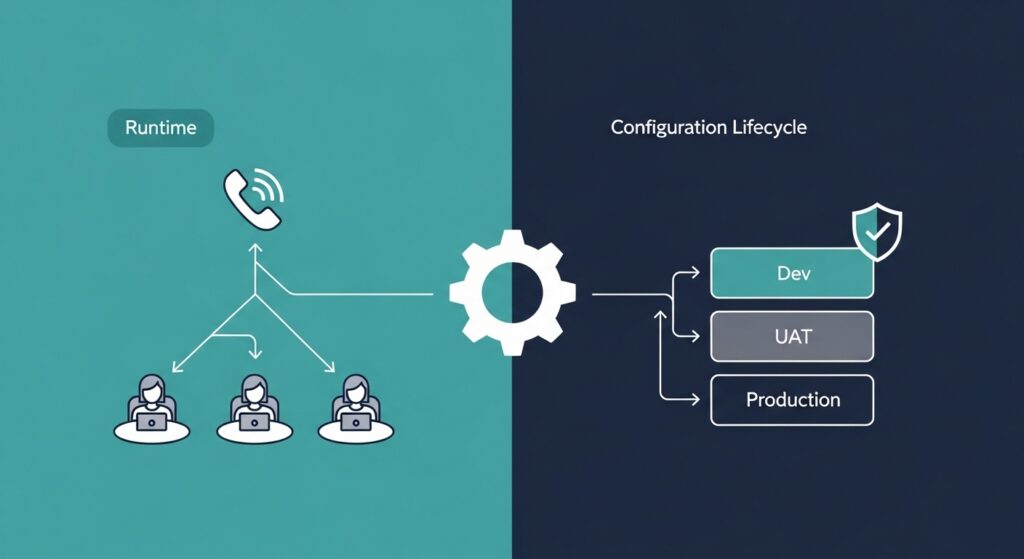
Genesys Cloud offers a rich set of native automation capabilities — but there is a meaningful difference between automating how work flows through your contact center and automating how configuration changes are deployed, governed, and promoted across environments. Most organizations are doing the first. Far fewer are doing the second. And that gap is where the majority of contact center outages, configuration drift problems, and engineering bottlenecks live.
This guide covers both layers: the native automation tools built into Genesys Cloud, and the DevOps-level configuration governance that enterprise contact centers need to operate reliably at scale.
What Does Automation Mean in Genesys Cloud
Automation in Genesys Cloud operates across several distinct layers, and understanding the difference between them is the starting point for any serious automation strategy.
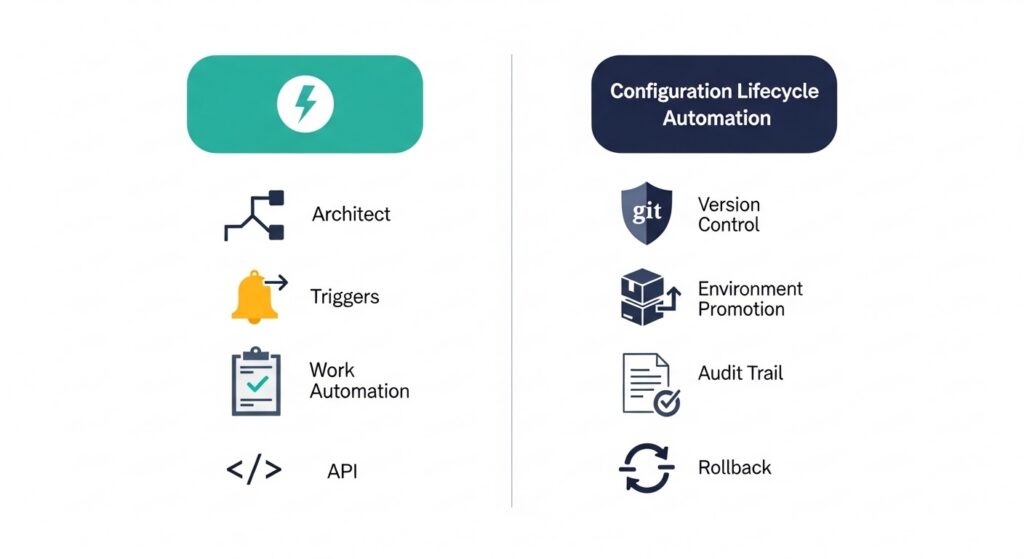
At the runtime layer, Genesys Cloud provides a powerful set of native tools that govern how work moves through the system in real time. Work Automation manages the lifecycle of back-office tasks and work items — routing them to the right queues, applying SLA-based prioritization, and tracking completion. Triggers allow administrators to define event-driven actions that fire automatically when specific conditions are met within the platform, enabling real-time responses to state changes without manual intervention. Architect — Genesys Cloud’s visual workflow designer — builds the call flows, chat flows, and message flows that determine how customer interactions are handled from the moment they arrive.
Beyond these tools, the Genesys Cloud API provides programmatic access to nearly every platform function, enabling organizations to sync external systems, update routing rules dynamically, and build custom automation on top of the platform’s native capabilities.
This layer of automation is focused on runtime behavior: how calls are routed, how tasks are assigned, how interactions are handled. It is essential, and Genesys Cloud does it well. But it is a different problem from the one most enterprise contact centers eventually hit — which is how to safely, consistently, and efficiently manage the configuration changes that make all of this runtime automation work.
Common Use Cases for Automation in Genesys Cloud
Automating Agent and User Management
One of the most operationally intensive areas in any Genesys Cloud environment is agent and user management. Skill assignments change as agents are trained, certified, or move between teams. Queue memberships shift with business requirements. Status-based automation can trigger actions based on agent availability, reducing the manual overhead of tracking and updating agent profiles across large workforces.
Native Genesys Cloud tools and API integrations can automate much of this — connecting with HR systems to provision new agents, syncing skill profiles from learning management platforms, and updating queue membership in response to workforce management system changes. For high-volume operations with frequent agent lifecycle events, this automation eliminates significant manual administrative effort.
Automating Task and Work Item Routing
Genesys Cloud’s Work Automation capability addresses back-office workflows that sit alongside real-time customer interactions — document processing, case management, compliance tasks, and other work items that require structured routing and SLA management. Automation at this layer ensures work items are prioritized correctly, assigned to agents with the right skills, and escalated when SLA thresholds are approaching.
For contact centers managing complex back-office operations alongside front-office customer interactions, this is a significant capability. It brings the same routing intelligence applied to voice and digital interactions to the broader universe of work that agents handle.
API-Driven Configuration Updates
The Genesys Cloud API enables dynamic configuration updates that go beyond what the administrative UI supports out of the box. Organizations use API-driven automation to sync routing configurations with external business logic, update queue parameters in response to real-time conditions, and integrate Genesys Cloud configuration with broader enterprise system orchestration layers.
This is powerful, but it also introduces a governance challenge: API-driven changes applied directly to production environments bypass the review, documentation, and validation processes that change management frameworks require. The speed of API automation and the discipline of change governance need to coexist — and that requires deliberate process design.
The Limits of Native Automation in Genesys Cloud
The native automation capabilities described above are focused on a specific problem: making the contact center operate more efficiently at runtime. They are not designed to solve a different but equally important problem: managing the lifecycle of configuration changes as they move from development through testing into production.
This is the distinction between runtime automation and configuration lifecycle automation — and it is where Genesys Cloud’s native tooling reaches its limits.
Out of the box, Genesys Cloud does not provide structured version control for configuration objects. There is no native mechanism to compare the configuration state of a development environment against a production environment and identify what has diverged. There is no built-in promotion workflow that moves a validated set of configuration changes from UAT to production in a controlled, documented, repeatable way. Rollback capability is limited — reverting a configuration change requires manual reconstruction of the previous state rather than a single automated action.
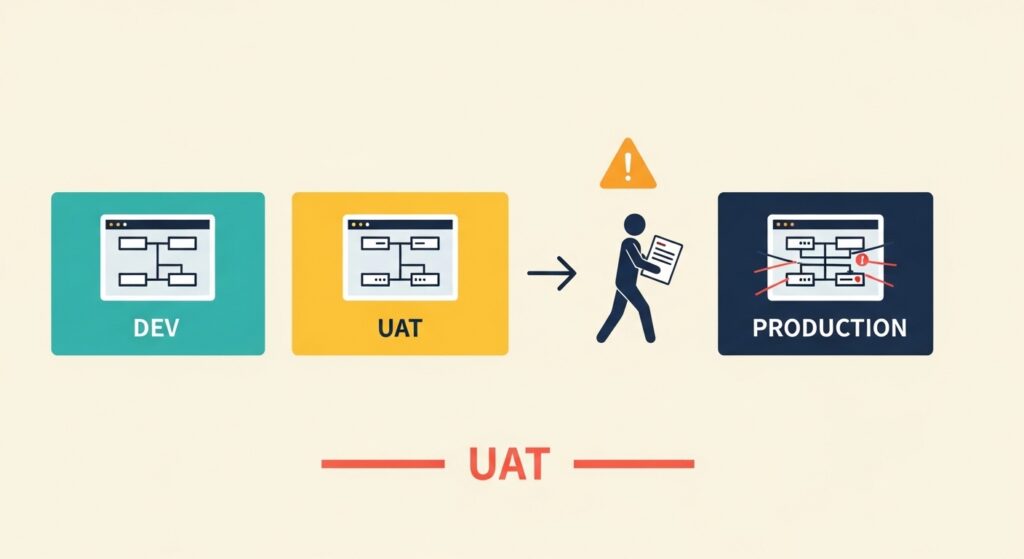
The consequence of these gaps is configuration drift: the gradual divergence between what exists in your production environment and what was designed, tested, and approved in your development environment. Configuration drift accumulates quietly. Routing rules are adjusted directly in production to handle an urgent issue. A queue parameter is tweaked without a corresponding update in the test environment. An IVR flow is modified during an incident and never formally documented. Over time, the production environment becomes a system whose actual state no longer matches any documented baseline — and troubleshooting, auditing, and safe future deployments all become significantly harder as a result.
What Is DevOps for Genesys Cloud?
DevOps for Genesys Cloud applies the principles of modern software engineering — infrastructure as code, CI/CD pipelines, automated promotion, version-controlled configuration, and audit trails — to the contact center configuration lifecycle.
The distinction is important. DevOps automation in this context is not about how calls are routed or how work items are prioritized. It is about how the configuration that governs all of those runtime behaviors is developed, validated, approved, deployed, and recovered when something goes wrong.
In a mature Genesys Cloud DevOps model, every configuration change — a new routing flow, a modified skill assignment rule, an updated queue priority — originates in a development environment, is tested in a UAT environment that mirrors production, passes through a formal approval workflow, and is promoted to production through an automated pipeline that generates documentation, creates an audit trail, and preserves rollback capability. No configuration change is applied manually to production outside of this process.
This is the same discipline that software engineering teams apply to application code. Contact center platforms like Genesys Cloud are complex, mission-critical software environments — and they deserve the same engineering rigor.
Automating Configuration Changes Across Multiple Genesys Cloud Environments
For enterprise contact centers, the environment management challenge extends beyond a simple Dev-to-Production pipeline. Large organizations typically operate multiple Genesys Cloud environments: dedicated development environments for building and testing changes, UAT environments for business validation, production environments, and in some cases separate disaster recovery or regional environments with their own configuration requirements.
Managing configuration consistency across this landscape manually is not just inefficient — it is a structural source of risk. Each manual replication of a configuration change between environments is an opportunity for a transcription error, a missed object, or a version mismatch that only surfaces when the change reaches production.
Automated environment synchronization addresses this directly. Rather than manually reproducing configuration changes across environments, changes are packaged into controlled promotion units — changesets — that move through the environment pipeline automatically. Each promotion is validated, documented, and logged. The configuration state of each environment is tracked against a known baseline, making drift visible and actionable rather than invisible and accumulating.
For multi-org deployments, disaster recovery environments, and organizations managing Genesys Cloud alongside legacy Genesys platforms, this kind of structured environment management is not a nice-to-have. It is a prerequisite for operational resilience.
Comparing Native Automation vs DevOps-Level Automation
| Capability | Native Genesys Cloud Automation | DevOps-Level Automation |
|---|---|---|
| Call and interaction routing | Architect flows, Triggers | Not applicable (runtime layer) |
| Work item management | Work Automation | Not applicable (runtime layer) |
| Agent provisioning | API integration | Automated via pipeline |
| Configuration version control | Not available natively | Full version history per object |
| Environment promotion | Manual replication | Automated changeset promotion |
| Cross-environment comparison | Not available natively | Automated drift detection |
| Change documentation | Manual | Auto-generated per deployment |
| Rollback capability | Manual reconstruction | Single-action automated rollback |
| Audit trail | Limited | Complete deployment history |
| Approval workflows | Not available natively | Enforced at pipeline gate |
The two layers are complementary, not competitive. Native automation makes the contact center operate efficiently. DevOps-level automation makes the configuration lifecycle that supports that operation safe, governed, and scalable.
Why Enterprise Contact Centers Need Change Governance
In standard software environments, a failed deployment is an inconvenience. In a contact center processing thousands of customer interactions per hour, it is a business-critical incident with immediate financial, operational, and reputational consequences.
The research on this is consistent. The IT Process Institute found that 80% of unplanned outages are caused by ill-planned changes made by administrators or developers. The Enterprise Management Association reported that 60% of availability and performance errors result directly from misconfigurations. Gartner projected that 80% of outages impacting mission-critical services are attributable to people and process issues — specifically change, configuration, and handoff failures.
These are not technology failures. They are governance failures — the predictable result of applying manual, undisciplined change processes to complex, high-stakes environments.
Enterprise contact centers face additional governance requirements that amplify the need for structured change management. Regulated industries — financial services, healthcare, utilities — require demonstrable audit trails showing what changed, when, who approved it, and what the system state was before and after. Separation of duties requirements mean that the person who develops a change cannot be the same person who approves its production deployment. Compliance frameworks increasingly require that configuration management practices meet the same standards as application change management.
Manual processes cannot reliably satisfy these requirements at scale. Governance automation can.
How to Implement Automated Change Management in Genesys Cloud
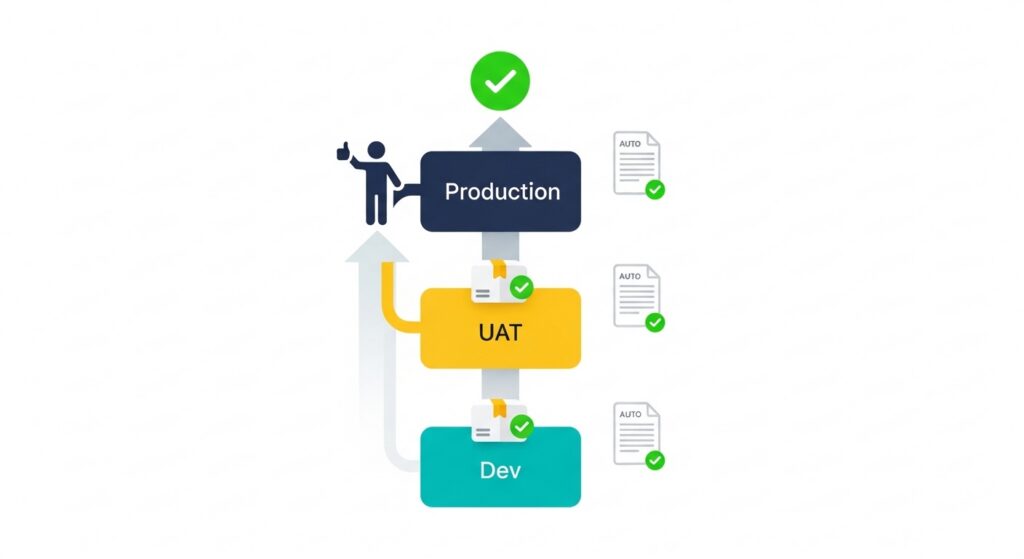
Moving from manual configuration management to automated change governance is not an overnight transformation, but it follows a clear progression:
Identify your configuration lifecycle gaps. Map the current journey of a configuration change from development to production. Where are the manual steps? Where does documentation lag behind deployment? Where are rollback procedures undefined or untested? These gaps are your risk surface.
Standardize your environment structure. Automated promotion requires consistent environment architecture. Development, UAT, and production environments should mirror each other structurally — same object types, same naming conventions, same configuration baseline — so that a change validated in UAT behaves identically when promoted to production.
Introduce version tracking for configuration objects. Every configuration object — routing flows, queues, skills, IVR scripts, user profiles — should have a tracked history of changes. This is the foundation of both auditability and rollback capability. Without it, you cannot know what changed, when, or why.
Automate promotion workflows. Replace manual environment-to-environment replication with automated changeset promotion. Changes are grouped, validated, and moved through the pipeline as controlled units — not as individual manual operations. Each promotion generates documentation automatically, ensuring that the audit trail reflects what was actually deployed.
Implement and test rollback strategy. Rollback capability that exists on paper but has never been executed under realistic conditions is not reliable rollback capability. Define rollback procedures, automate them where possible, and test them regularly.
This is precisely the operational model that Inprod is built around — providing automated change control, environment promotion, audit trail generation, and rollback capabilities for Genesys environments so that DevOps teams can move faster without reintroducing the manual error risk that governance is designed to prevent.
Frequently Asked Questions About Automating Genesys Cloud
Does Genesys Cloud have built-in version control?
No. Genesys Cloud does not provide native version control for configuration objects. While the platform logs some change history, there is no structured mechanism to track configuration versions, compare environment states, or restore a previous configuration baseline. Organizations that require version control for Genesys Cloud configuration — for governance, audit, or rollback purposes — need to implement it through third-party tooling or custom development.
How do you automate deployments in Genesys Cloud?
Native deployment automation in Genesys Cloud is limited to what the API and built-in tools support. For structured, governed deployment automation — moving validated configuration changes from development through UAT to production with documentation, approval workflows, and rollback capability — organizations typically implement a DevOps layer on top of the platform. This involves changeset-based promotion tooling, environment synchronization, and automated change documentation that the platform does not provide natively.
What is work automation in Genesys Cloud?
Work Automation is a native Genesys Cloud capability for managing back-office tasks and work items — non-real-time work that needs to be routed, prioritized, tracked, and completed alongside customer interactions. It applies the same queue-based routing intelligence used for voice and digital interactions to structured work items like cases, documents, and compliance tasks.
How do you manage multiple Genesys Cloud environments?
Managing multiple Genesys Cloud environments — development, UAT, production, disaster recovery — requires a structured approach to environment synchronization and change promotion. Without automation, changes must be manually replicated across environments, which introduces transcription errors, version mismatches, and configuration drift. Automated changeset promotion tools address this by moving validated changes through the environment pipeline consistently, with full documentation and rollback capability at each stage.
What is configuration drift in Genesys Cloud?
Configuration drift is the gradual divergence between the intended configuration state of a Genesys Cloud environment — as designed, documented, and approved — and its actual state in production. It accumulates through direct production edits, undocumented emergency changes, and manual replication errors over time. Left unaddressed, configuration drift makes troubleshooting harder, audit compliance more difficult, and future deployments less predictable. Automated environment comparison and baseline tracking are the primary tools for detecting and correcting it.
